Protéger les endpoints avec les Honeytokens
La protection par Honeytoken place un identifiant AWS leurre sur chaque machine de développeur. Cet identifiant ne donne accès à rien, donc personne n'a de raison légitime de l'utiliser. Dès que quelqu'un le fait, GitGuardian déclenche une alerte qui vous indique quelle machine a été compromise.
Pourquoi déposer des honeytokens sur les machines des développeurs
Le scan des endpoints inventorie les identifiants déjà présents sur une machine. La protection par Honeytoken ajoute la détection d'intrusion à ce même déploiement, de sorte que vous savez aussi dès qu'une personne tente de les voler.
Les collecteurs d'identifiants sont des programmes qui recherchent des identifiants enregistrés sur une machine et les envoient à un attaquant. Ils atteignent les machines des développeurs via des packages malveillants, des outils piégés et des extensions de navigateur malveillantes. Leur comportement est prévisible : lire les emplacements d'identifiants bien connus (.env, .gitconfig, .npmrc, etc.) et exfiltrer ce qui s'y trouve. Déposer un leurre précisément à ces emplacements signifie que le premier geste de l'attaquant est celui qui le trahit.
Cela vous apporte quelques éléments difficiles à obtenir avec toute autre couche de détection :
- Un signal sans ambiguïté. Le leurre n'a aucune utilité légitime, donc toute utilisation de celui-ci est par définition non autorisée. Il n'y a pas de référence à apprendre, aucun réglage à effectuer et aucune liste de signatures à maintenir à jour.
- Une dernière ligne de défense. Si un malware a déjà réussi à passer votre EDR et vos autres contrôles des endpoints, l'utilisation du leurre le révèle malgré tout.
- Une machine nommée à examiner. L'événement contient l'adresse IP, le user agent et l'horodatage, et le honeytoken se résout en un endpoint spécifique et son propriétaire, ce qui est précisément le point de départ d'une investigation.
- Une couverture mesurable. Le dashboard indique la part de votre parc qui est protégée et liste les endpoints qui ne le sont pas, de sorte qu'il s'agit d'un programme que vous pouvez mener à terme plutôt qu'un simple effort au mieux. Voir Surveiller la couverture.
- Aucun agent supplémentaire à déployer. Le dépôt réutilise le binaire
ggshieldque vous installez déjà pour le scan et écrit un fichier plutôt que d'exécuter un processus résident, de sorte qu'il n'y a rien de nouveau à certifier ni de coût continu sur la machine.
Pour les développeurs, le dépôt est discret. Il ne touche jamais qu'à son propre profil et laisse intact tout autre profil AWS sur la machine.
Fonctionnement du dépôt
La commande ggshield honeytoken plant réconcilie la machine avec GitGuardian à chaque exécution. Elle demande à GitGuardian quel est l'état souhaité pour cet endpoint, puis l'applique sur le disque :
- Pour un honeytoken actif, elle écrit ou actualise le profil d'identifiant AWS leurre.
- Pour un honeytoken que vous avez révoqué dans GitGuardian, elle supprime ce profil de la machine.
- Tout autre profil dans le fichier est préservé.
ggshield ne révoque jamais un honeytoken de lui-même. Il applique l'état souhaité et rend compte de l'emplacement où le honeytoken a atterri. La révocation reste une action délibérée que vous effectuez dans GitGuardian, ce qui signifie qu'un nettoyage sur une machine ne peut jamais désactiver un fil-piège sur lequel vous comptez encore.
Comme la commande réconcilie plutôt qu'elle n'ajoute, l'exécuter à plusieurs reprises est sûr. Une machine qui a déjà été dotée d'un leurre reste en l'état.
Le dépôt nécessite le scope honeytokens:write sur le token que ggshield utilise. Ce n'est pas la même chose que honeytokens:check, qui existe pour que le scan des endpoints ne déclenche pas vos propres honeytokens lorsqu'il les rencontre. Un parc qui fait les deux a besoin des deux scopes.
Déployer la protection par Honeytoken
La protection par Honeytoken se déploie de la même manière que le scan, via votre MDM, et les deux sont indépendantes. Un endpoint peut être scanné sans être doté d'un leurre, et le dashboard rend compte de chacun séparément.
Le chemin le plus simple est ggshield machine setup, qui dépose le honeytoken dans le cadre d'une exécution idempotente unique qui configure également les AI Hooks et les git hooks. Planifiez cette tâche unique et le honeytoken est réconcilié à chaque passage. Si vous souhaitez le honeytoken seul, exécutez directement ggshield honeytoken plant, soit dans la tâche qui exécute déjà votre scan d'inventaire quotidien, soit comme sa propre tâche à une fréquence plus faible, puisque l'état souhaité change bien moins souvent que les résultats de scan.
Pour la configuration du token, les modèles de tâches MDM et le détail de la planification, suivez Déployer ggshield à grande échelle avec un token de compte de service.
Pour déposer sur une seule machine :
export GITGUARDIAN_API_KEY="<SAT_FROM_SECRET_STORE>"
export GITGUARDIAN_INSTANCE="<GITGUARDIAN_INSTANCE_URL>"

ggshield honeytoken plant
Pour voir quelles cibles seraient écrites sans contacter GitGuardian ni toucher au disque, utilisez d'abord un essai à blanc :
ggshield honeytoken plant --list-targets
Pour la liste complète des options, y compris comment remplacer le nom du profil et cibler un utilisateur spécifique, voir la référence ggshield honeytoken plant.
Vérifier qu'une machine est protégée
Ouvrez l'endpoint dans Endpoint protection > Endpoints et consultez la carte Honeytoken protection, qui indique la dernière synchronisation, combien de honeytokens sont déployés et depuis combien de temps la machine est protégée. L'onglet Honeytokens liste chacun d'eux avec sa méthode de placement, son statut, ainsi que la date de son dépôt et de sa dernière synchronisation.
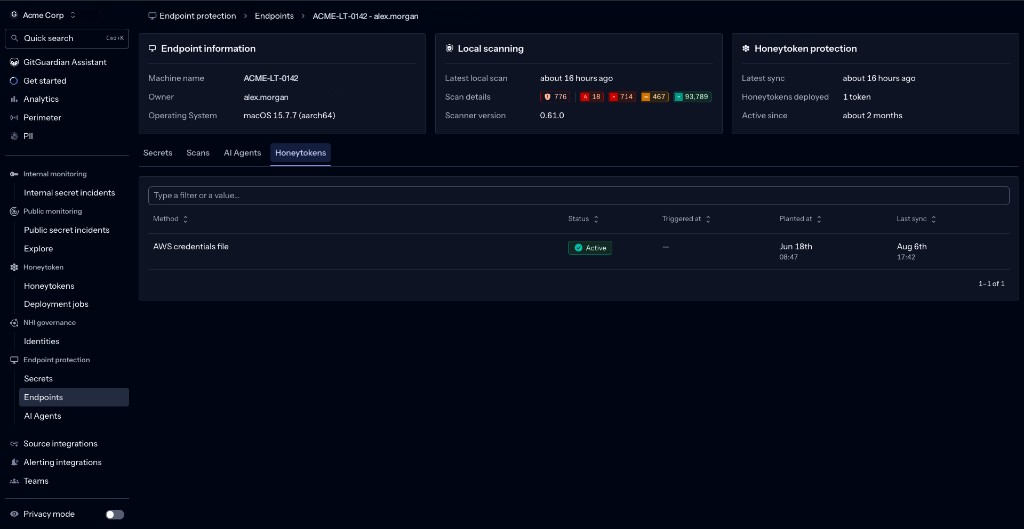
Une machine qui n'affiche aucune synchronisation récente est une machine dont la tâche de dépôt ne s'exécute pas. Comme la commande réconcilie à chaque exécution, une synchronisation obsolète signifie aussi qu'un honeytoken que vous avez révoqué peut encore se trouver sur ce disque.
Auditer vos honeytokens d'endpoints à grande échelle
Pour passer en revue chaque honeytoken déposé sur l'ensemble du parc, allez dans Honeytoken > Honeytokens et filtrez sur Source type is Endpoints.
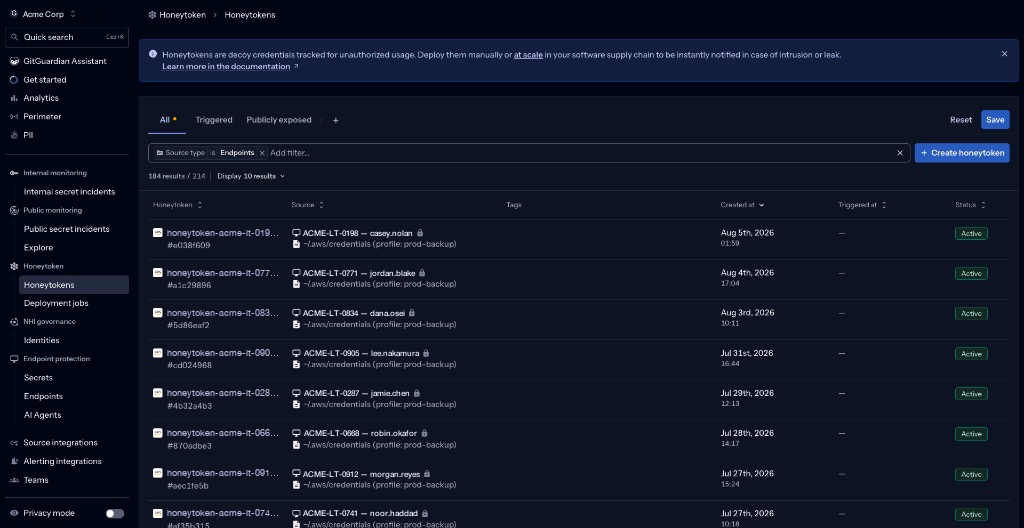
Ouvrir l'un d'eux montre où il se trouve. La carte Sources résout le honeytoken en une machine et son propriétaire, nomme le profil sur disque dans lequel il a été écrit, et le marque comme Planted.
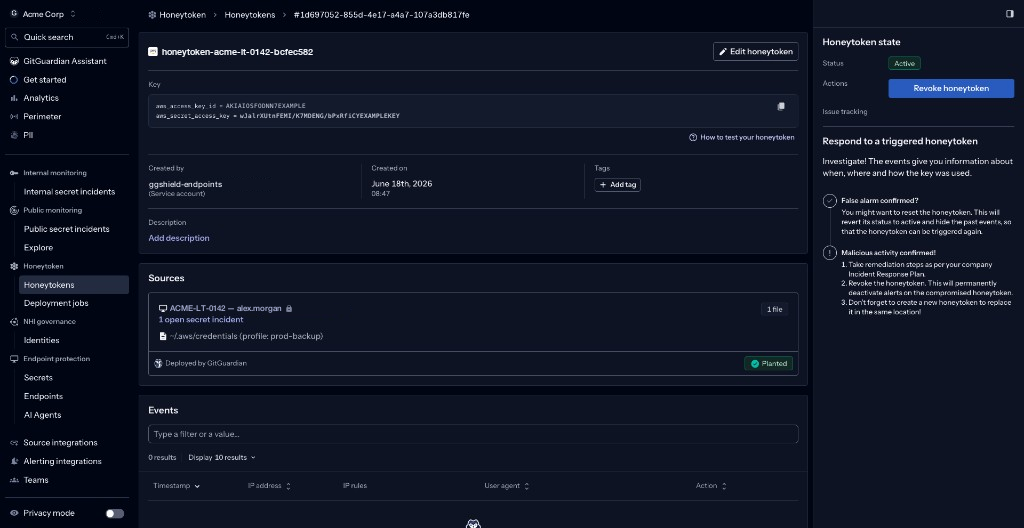
Pour tout ce que vous pouvez faire d'autre depuis cette vue, comme le tag et le filtrage, voir Gérer votre population de honeytokens.
Retirer un honeytoken d'une machine
Le retrait est un processus en deux étapes, par conception :
- Révoquez le honeytoken dans GitGuardian, ce qui l'empêche d'être un fil-piège actif. Voir Répondre à un honeytoken déclenché.
- Laissez la prochaine exécution de dépôt le supprimer du disque. Pour exécuter une passe de nettoyage qui applique uniquement les suppressions et n'écrit rien de nouveau, utilisez
ggshield honeytoken plant --remove-only.
C'est également le chemin de retour arrière. Désactiver la tâche de dépôt arrête les nouveaux placements, et une passe --remove-only efface ce qui s'y trouve déjà.
Lorsqu'un honeytoken est déclenché
Un honeytoken déclenché sur un endpoint signifie que quelqu'un a utilisé un identifiant qui n'existe sur cette machine que comme leurre. Considérez la machine comme compromise et examinez à partir de là.
L'alerte et la réponse aux honeytokens fonctionnent de la même manière quel que soit l'endroit où le honeytoken a été déposé :
- Configurer vos alertes pour acheminer les événements vers l'e-mail, Slack, Microsoft Teams ou un webhook.
- Comprendre les événements de honeytoken et le mécanisme de déclenchement pour savoir ce que chaque événement vous indique.
- Répondre à un honeytoken déclenché pour le workflow de réinitialisation et de révocation.

