Catch secret theft on your developers' machines with a Kubeconfig honeytoken
 Release Date: November 12, 2026
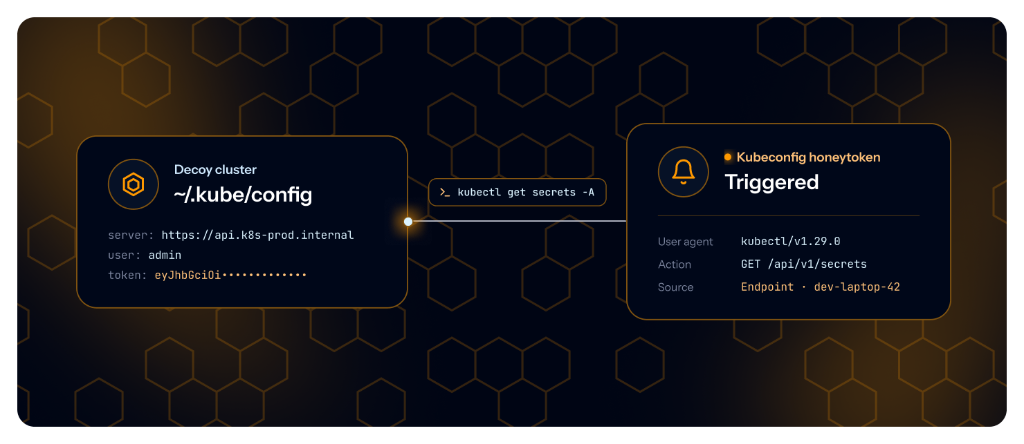
Stealing secrets from developer machines is now an industry. TeamPCP opened the year with Trivy and LiteLLM, then reused what it stole to reach Mistral, Grafana and GitHub. It open-sourced its Mini Shai-Hulud worm in May, and copies followed: four campaigns in two weeks across npm, PyPI, Crates.io, Composer and GitHub, four more in June, and in August a single wave that hit 800 npm packages and 469 secret locations on each infected machine. The payload changes every month, but the shopping list does not: every credential on the machine, including the ~/.kube/config that opens your Kubernetes clusters.
Honeytoken catches the theft. It already plants a decoy AWS key on your endpoints. It now plants a Kubeconfig decoy as well, written into ~/.kube/config next to your real clusters and pointing to a cluster GitGuardian controls. A stealer takes it with the rest. The first call made with it raises an alert and names the machine it was taken from. Ships in ggshield 1.56 or later.
What does this mean for you?
- Indistinguishable from a real cluster: the file is exactly what
kubectlwrites, and secret scanners, including our own Kubeconfig detector, flag the token as live. Yet it opens no cluster and holds no permission. - An alert on the first call: any request made with the token creates an event with the IP address, country, user agent and path, and fires your alerts by email, Slack, Microsoft Teams, ServiceNow or webhook.
- A named machine, not a hash: the Sources card tells you which laptop or runner the file was taken from, and who owns it.
- Safe for the owner: on a machine that already has a kubeconfig, the decoy never becomes the current context, so a developer's own
kubectlcannot trip it. - Nothing new to install:
ggshieldwrites the file and leaves. Revoke the honeytoken and the next run removes it. Plant it alongside the AWS key decoy: each trigger tells you which file was read.
Why is this important?
A secret theft is silent. The malware reads a few files and sends them out. Nothing breaks, no service goes down, and the stolen keys keep working for their legitimate owners. Most victims learn about the breach when the attacker starts using the keys, often weeks later, and by then the keys have been tested and sorted. After the TeamPCP compromise of LiteLLM, Wiz saw stolen secrets validated within hours. The loot from that 40-minute window was only measured five months later: 153 GB and 2,488 organizations, many of which nobody can even notify.
A honeytoken is the strongest signal you can get of such a theft. The decoy has no legitimate use, so any call made with it means that someone took your secrets. It fires at the first step of the attack, when the attacker checks which stolen keys are valid, and before any real key is used against you. It does not depend on catching the malware itself, so it works against packages your EDR and your dependency scanner have never seen. And because GitGuardian knows where each decoy was planted, the alert comes with the name of the compromised machine, which is where your investigation starts.
Start trapping bad actors today!
Available on SaaS for workspaces with Endpoint Protection on a Growth or Enterprise plan. If your fleet already plants AWS key honeytokens, add one line to the job:
ggshield honeytoken plant --type kubeconfig
Requires ggshield 1.56 or later and the honeytokens:write scope. See Honeytoken types, Protect endpoints with Honeytokens and the ggshield honeytoken plant reference.
Enhancements
- Public Monitoring: Filter public incidents by Source owner: the GitHub organization or user, or the Docker Hub namespace, that published the source.
- Public API:
- Revoke a secret with
POST /v1/secrets/{secret_id}/revoke. Pass provider credentials in thecredentialsbody field to override the workspace defaults. Thedetectorobject of secret and incident responses lists which ones the revoker needs. Requires thesecrets:writescope. - Filter
GET /v1/check-runsbycommit_sha,pull_request_numberorsource_id, in addition toincident_id, so you can find the check runs of a pull request even when its findings have no incident. Each check run now also returns its repository's full name and source id. - Public incidents now carry the agents analysis result,
company_related_verdict(related,unclear,unrelated) andagents_stage, in the list, the detail and the CSV export, and both are filterable, so a SIEM or ticketing tool can reproduce your dashboard views. Available to workspaces with agents analysis.
- Revoke a secret with
- Team Sync: When team sync is on, the Teams page gains a Synced from filter on the provider teams come from, so you can tell synced teams from the ones created by hand.
- Authentication: Password logins are now locked out for six minutes after ten failed attempts for the same email and IP address. The login endpoint answers
429with aRetry-Afterheader, and apassword_login_locked_outentry in the audit log records the IP address and the number of attempts. - Perimeter: On an integration's perimeter, Select all N that match filters is now available at the root level, as on the Perimeter page, so you can monitor or unmonitor every source of an integration in one action.
- JFrog Container Registry Integration: Federated Docker repositories are now scanned alongside local ones. On existing installations, new federated repositories are not monitored by default, so you choose which ones to add.
Fixes
- Public Monitoring: Fixed an issue where adding a custom tag to a filtered selection of public incidents with "select all" applied the tag to every public incident.
- NHI Governance: Fixed an issue where the ggscout configuration examples on the integration setup page for CyberArk Secrets Manager, GCP Secret Manager and Kubernetes used options ggscout does not read, so the configuration failed to load or silently ignored the key file.
- Historical scans: Fixed an issue where the queued scans of a large bulk were timed out after a week of waiting for a slot.
- SharePoint Online and OneDrive Integrations: The
Organization.Read.Allpermission is no longer required on your Entra application. Without it, the installation is named after its tenant ID.

