Aller au contenu principal

3 articles tagués avec « prioritization »

Voir tous les tags

Push your secret incidents to Wiz

calendar icon   Release Date: September 30, 2026

Wiz integration

Secrets and cloud risk are the same story told in two tools. The leaked credential lives in GitGuardian, the resource it unlocks lives in Wiz, and the person who has to decide what to fix first is stuck comparing two consoles.

GitGuardian now pushes your secret incidents to Wiz as native secret findings. Every day, your active incidents from version control sources land in Wiz with their detection context and a link back to GitGuardian.

What does this mean for you?

  • One place to prioritize: Leaked credentials appear as Wiz secret findings, next to the cloud misconfigurations and vulnerabilities your security team already triages, so secrets stop being a separate queue.
  • Full detection context travels with the finding: Repository, file path, commit, detector, validity and severity, plus a direct link to the GitGuardian incident when someone needs the complete picture.
  • Severity you already agreed on: The severity of the GitGuardian incident sets the severity of the Wiz finding, so a critical secret reads as critical on both sides.
  • No secret ever leaves GitGuardian: Findings carry a SHA-256 hash of the secret and its metadata only. Wiz never receives a secret value.
  • Findings close themselves: Each sync sends the full list of active incidents. Resolve or ignore an incident in GitGuardian and it drops out of the next upload, so Wiz removes the finding on its own.

Why is this important?

A valid credential is rarely the end of an incident, it is the entry point. Whoever picks it up next moves laterally into the cloud account it opens, and the two halves of that path usually sit in two different tools owned by two different teams. Putting secrets in front of the people who already own cloud risk removes the handoff, and with it the days lost between detection and remediation.

Get Started Today!

Create a Wiz service account with permission to upload findings, then go to Settings > Integrations > Wiz and paste your Client ID, Client secret, Authentication URL, and API endpoint URL. You can pause or resume the sync at any time.

Integrate Wiz

Enhancements​

  • Public Monitoring agents: the new GitGuardian agents page shows how the agents classified all your public incidents (Related, Unclear, Not related) and how they moved through triage and deep analysis, with each count linking to the matching incidents.
Secret Enricher - From Generic to Actionable

calendar icon   Release Date: December 17, 2025

Secret Enricher thumbnail

We're transforming how you interact with generic incidents. Secret Enricher replaces vague detector names with precise, ML-enriched secret identities, making every incident immediately actionable.

What's changed?

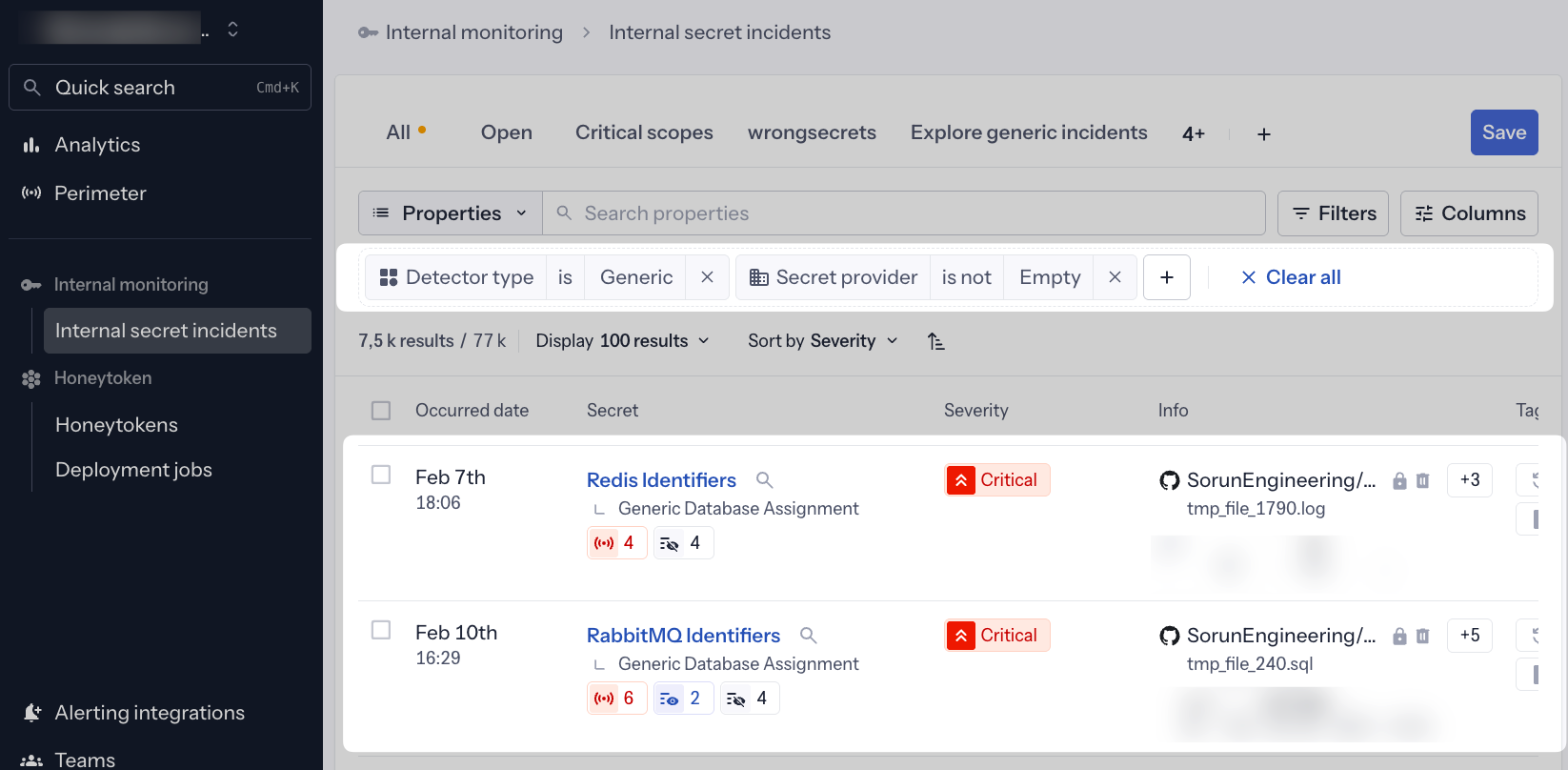
Instead of seeing generic detector names like "Generic Database Assignment" or "Generic High Entropy Secret," you now see the actual enriched secret type directly in the incident list:

  • ❌ Before: "Generic Database Assignment"

  • ✅ Now: "Redis Identifiers", "PostgreSQL Connection String", "MongoDB Credentials"

  • ❌ Before: "Generic High Entropy Secret"

  • ✅ Now: "Stripe API Key", "AWS Access Key", "Twilio Auth Token"

Why does this matter?

This shift from detector-centric to enrichment-driven incidents fundamentally changes how you understand and prioritize your security posture:

  1. Instant Context: Know exactly what type of secret leaked at a glance—no need to open each incident
  2. Faster Triage: Immediately identify critical infrastructure secrets (databases, cloud providers, payment systems)
  3. Confident Prioritization: Clear secret categories help you focus on high-impact incidents first
  4. Accelerated Remediation: Understanding what leaked speeds up the remediation workflow

How it works

Powered by our Secret Enricher v2 machine learning model, the platform analyzes the full context around generic secrets to identify:

  • Provider: The specific service (Redis, Stripe, AWS, etc.)
  • Category: The type of service (Database, Payment System, Cloud Provider, etc.)
  • Family: Broader grouping for filtering and analysis

When our ML model successfully enriches a generic incident, the enriched name automatically becomes the primary display name throughout the platform—in incident lists, dashboards, filters, and reports.

Availability: Business and Enterprise plans.

What's next?

This enhancement brings us closer to our ultimate goal: zero generic secrets in your workspace. By making ML-driven categorization tangible and actionable, we're ensuring every secret detection provides maximum clarity and definition.

The enriched names work seamlessly with all existing Secret Enricher features:

Learn more about Secret Enricher


Enhancements​

  • Incident API: Enhanced incident retrieval endpoints to include enriched secret names in API responses for programmatic access.
  • Export Reports: CSV and JSON exports now include both the original detector name and enriched secret name for comprehensive reporting.

Fixes​

  • Docker Hub Integration: Fixed an error where users encountered "Input should be 'image' or 'manifest'" when configuring the Docker Hub source connector.

Explore and prioritize your Generic Incidents

calendar icon   Release Date: March 10, 2025

GSE-filters

We are excited to unveil the "Generic Secret Enricher V1", a machine learning model designed to enhance our capabilities in generic secret detection. This innovative model analyzes the entire context of a document, identifying the company and category associated with a secret, thereby providing meaningful insights to help users understand the origin and type of a discovered secret.

New Features​

  • Contextual Analysis: Upon detection of a generic secret, our platform analyzes the full document context to determine the associated provider or category of a secret.

  • Efficient Classification: This feature reduces the need for manual classification, enabling users to quickly comprehend the source and nature of a discovered generic secret.

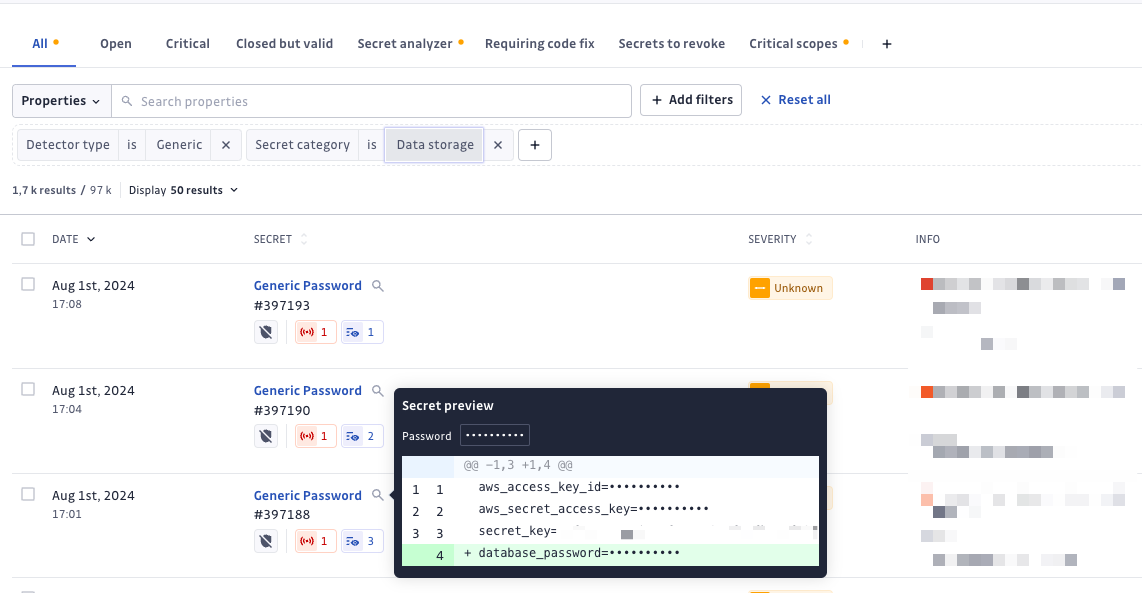
  • New Filters: We've introduced three new filters - Provider, Category, Family - to help identify critical generic incidents. To use these, filter your incidents by the "Generic" type, then apply a combination of these filters.

Goals​

Our long-term goal is to provide you with actionable insights, prioritize their generic incidents, and improve their remediation efforts.

Usage​

To use the new filters, simply filter your incidents by the "Generic" type, then apply a combination of the Provider, Category, and Family filters. This will help you identify the most significant or critical generic incidents, such as those classified under "Data Storage" or linked to the provider "Postgresql".

Fixes​

  • Jira Cloud Issue Tracking Integration: Resolved an issue where integration entered an invalid state after being uninstalled.
  • Microsoft Teams Alerts for Security Incidents: Resolved an issue where the wrong team was displayed during configuration.