Wiz
GitGuardian integrates with Wiz to push the secret incidents detected in your version control sources to Wiz as native secret findings. Security teams get a single view of secrets risk and cloud risk, and can prioritize and remediate leaked credentials directly from Wiz.
How it works
Once a day, GitGuardian sends your active secret incidents to Wiz:
- Scope: incidents detected in your version control sources (GitHub, GitLab, Bitbucket, Azure DevOps) with an open status (triggered or assigned).
- Granularity: one finding per incident and per repository. An incident groups all the occurrences of the same secret: when an incident has several occurrences in the same repository, only the most recently detected one is sent to Wiz, and the full list remains available in GitGuardian. Each finding carries the detection context: repository, file path, commit, detector, validity, last validity check date, and severity. Each finding also includes an
externalFindingLinkthat points to the incident in the GitGuardian dashboard, on the occurrence that was sent. - Privacy: GitGuardian never sends secret values to Wiz. Findings contain a SHA-256 hash of the secret and its metadata only.
Each sync sends the full list of active incidents. Wiz keeps findings open as long as they are present in the latest upload: when you resolve or ignore an incident in GitGuardian, it is dropped from the next sync and Wiz removes the finding automatically.
Severity mapping
The severity of the GitGuardian incident sets the severity of the finding in Wiz:
| GitGuardian severity | Wiz severity |
|---|---|
| Critical | Critical |
| High | High |
| Medium | Medium |
| Low | Low |
| Info | Your choice |
| Unknown | Your choice |
Wiz has no Info or Unknown severity, so you choose how GitGuardian maps them: to any Wiz severity, or Skip sending to keep these incidents out of Wiz.
You set both mappings when you configure the integration, and can change them at any time from the integration settings. A change applies from the next sync.
Configure the integration
You need a Wiz user allowed to add integrations. The GitGuardian integration in Wiz creates its own service account with the required permissions, so you don't need to create one beforehand.
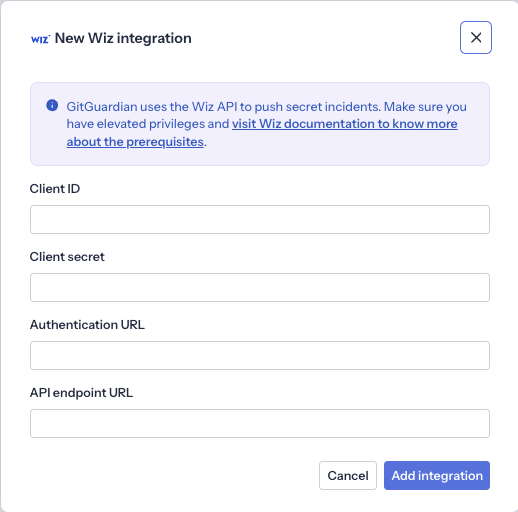
- In Wiz, open the GitGuardian integration, add it, and copy the Client ID, Client secret, Authentication URL, and API endpoint URL it displays.
- In GitGuardian, go to Settings > Integrations > Wiz and click Configure.
- Paste the four values from Wiz into the form, then choose how to map the Info and Unknown severities (see Severity mapping).
- Click Add integration.
Don't use a service account created manually from the Wiz settings. It doesn't have the permissions the integration needs, and the sync fails. Always create the credentials from the GitGuardian integration in Wiz.
You can pause or resume the sync at any time from the integration settings page.
GitGuardian is the source of truth: a finding ignored or resolved in Wiz is recreated at the next sync as long as the corresponding incident is still open in GitGuardian.
Troubleshooting
Most sync issues are handled by GitGuardian, so start with us. Wiz support only helps with sources that stay Skipped.
Contact GitGuardian support
Contact GitGuardian support if:
- A source hasn't synced in the last 24 hours.
- A source shows the Failed status. This can come from persistent rate limiting or an outage on Wiz's side: we investigate and coordinate with Wiz if needed.
- A source has shown the Syncing status for several hours.
- A source shows the Empty status even though it had open incidents at sync time.
- Wiz findings don't match GitGuardian incidents. Some properties are mapped between the two products (see Severity mapping), so small differences are expected.
Contact Wiz support
A source is marked Skipped when Wiz couldn't ingest all of its findings, usually because it doesn't support one of the detectors yet. GitGuardian adds detectors continuously, and Wiz can take several days to support a new one, so a Skipped status often clears on its own.
If a source keeps showing Skipped across several syncs, contact Wiz support.
Not sure which one applies? Contact GitGuardian support and we'll loop in Wiz if needed.
Limitations
- Only incidents from version control sources are sent. Secrets detected in other sources (Slack, Jira, Confluence, and others) are not pushed to Wiz. Gerrit sources are not supported.
- Incidents detected by custom detectors are not sent.
- Occurrences without a file path are skipped.
- Wiz ingests uploads in batches: new findings can take up to 24 hours to appear in Wiz.
- After an incident is resolved or ignored in GitGuardian, its finding can remain visible in Wiz for up to 7 days before Wiz removes it.

