Agents analysis
The agents analysis is in beta and may still evolve.
Overview
The hardest question about a public secret leak is rarely whether it is a secret. It is whether it is yours. A leak found on a public source can come from a developer's personal project, from a contractor, or from someone entirely unrelated who happens to work with the same technologies.
GitGuardian runs AI agents over your public secret incidents to answer that question on your behalf. A triage agent makes a first-pass assessment of each incident, and the most promising ones are promoted to a deep analysis agent for a more thorough investigation.
Their conclusions show up in three places:
- Company-related, the agents' verdict on whether a leak is yours,
- the Risk score, now set by the agents,
- the Analysis tab on the incident page, which holds the reasoning behind both.
The analysis is performed by large language models from GitGuardian's third-party LLM providers, and it is not affected by the workspace AI settings. See the AI Management Policy for how your data is handled and which providers are used.
The agents analysis is being rolled out progressively and is not enabled on every workspace yet. If the Company-related column and filter do not appear on your public incidents list, your workspace has not been switched yet: contact support@gitguardian.com to request it.
Company-related
Company-related is the agents' answer to "is this leak ours?". It is available as a column in the incidents table, as a filter, and as ready-made saved views.
| Value | What it means |
|---|---|
| Related | The agents concluded the leak is related to your company. These are the incidents to prioritize. |
| Uncertain | The agents could not determine whether the leak is related to your company. Worth a human look. |
| Unrelated | The agents concluded the leak is not related to your company. |
| Empty | The incident has not been analyzed yet. |
When filtering, each value can be narrowed down by which agent reached the conclusion, for example Triage ruled out or Deep analysis confirmed.
Only the deep analysis agent can confirm a leak as Related. Uncertain therefore covers two situations:
- an incident the deep analysis agent investigated without reaching a conclusion,
- and an incident that triage neither ruled out as unrelated nor selected for deep analysis. In both cases, no agent reached a conclusion, so these are the incidents where your own judgment adds the most.
Three default saved views pre-filter the list on the verdict, so you do not have to build the filter yourself: Company-related, Unclear if company-related and Not company-related. They sit alongside the existing All and Open views, and all five show the Company-related and Risk score columns by default.
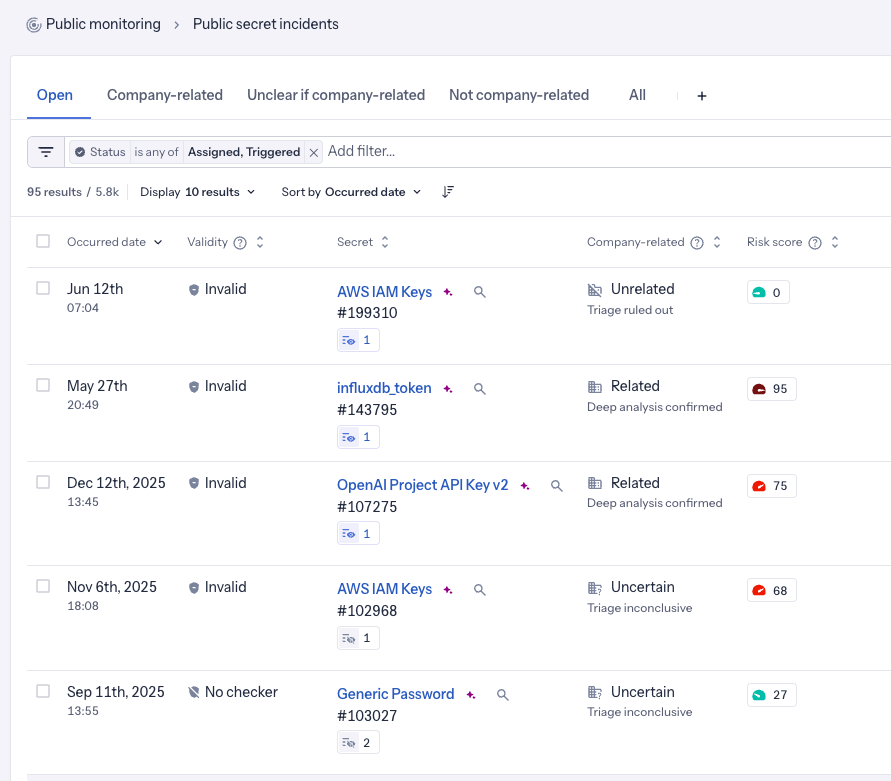
The agents analysis is asynchronous, so it lags behind detection rather than arriving with the incident. Coverage of past incidents also varies by workspace, and some incidents cannot be analyzed yet at all. We are working toward full coverage with analysis as close to detection as possible.
Filter on Company-related = Empty to find incidents with no analysis.
Start from the Company-related saved view to work the leaks that are yours, then order them by risk score and severity. Use Not company-related to clear out the rest.
Risk score
On workspaces with the agents analysis, the Risk score of a public incident is set by the agents. It is still a 0-100 value where 100 indicates the highest risk, and it still drives the score column, sorting and filtering.
Three behaviors are worth knowing:
- An incident the agents rule Unrelated always scores 0, whatever the technical risk of the secret. The incident page states why: Set to 0 because this leak is unrelated to your company.
- An incident that has not been analyzed yet has an empty risk score, never 0. A score of 0 always means the incident was analyzed, so an empty score should not be read as a harmless one.
- Once an incident has been analyzed, its score does not change on its own. Unlike the ML risk score it replaces, it is not recalculated as the incident ages.
The agents' score supersedes the ML risk score previously used on public incidents. It is a substantially more precise assessment, and it weighs how relevant the leak is to your company rather than only the technical risk of the secret.
Analysis tab
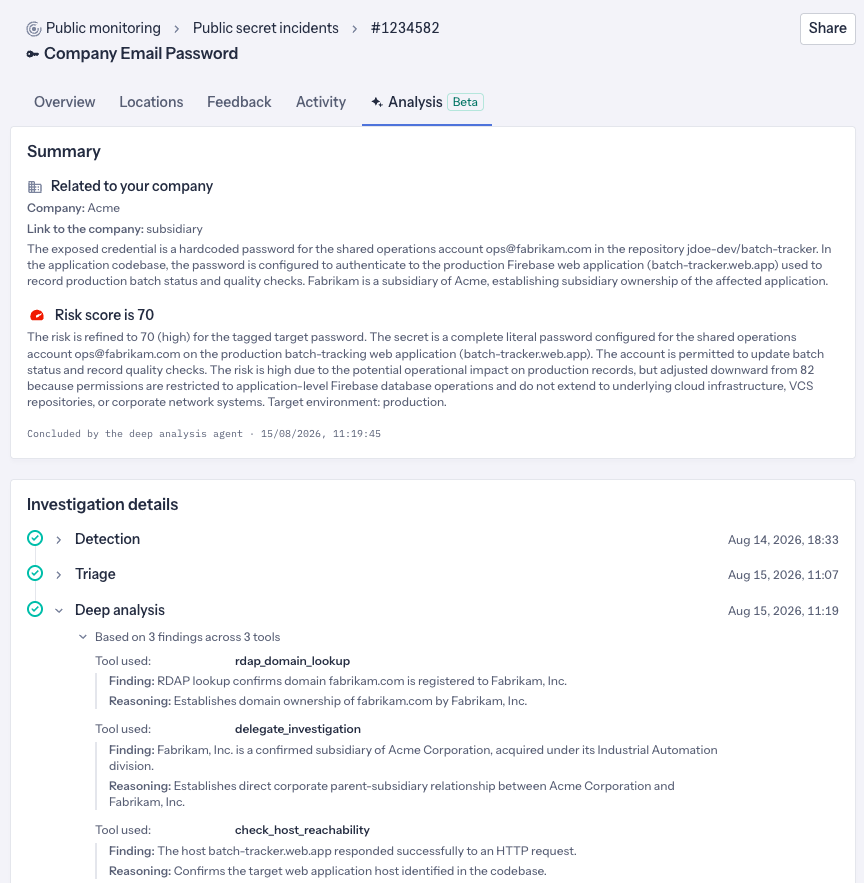
The Analysis tab on the incident page holds the agents' output, in two parts.
Summary gives you the conclusion at a glance: the verdict on your company, the company the agents identified, a short rationale, the risk score together with the reasoning behind it, and which agent concluded, when.
Investigation details traces how the agents got there: detection, then the triage assessment, then the deep analysis when it ran. Turn to it when you want to see what the agents actually found on an incident, or to back up a conclusion before acting on it. When an incident was not promoted to deep analysis, that step is marked as skipped.
Next steps
- Prioritize incidents - severity rules, filtering and saved views
- Remediate incidents - act on the leaks that are related to you, and ignore the ones that are not

