GitGuardian now listed on the Slack Marketplace, packed with new capabilities!
 Release Date: April 23, 2026
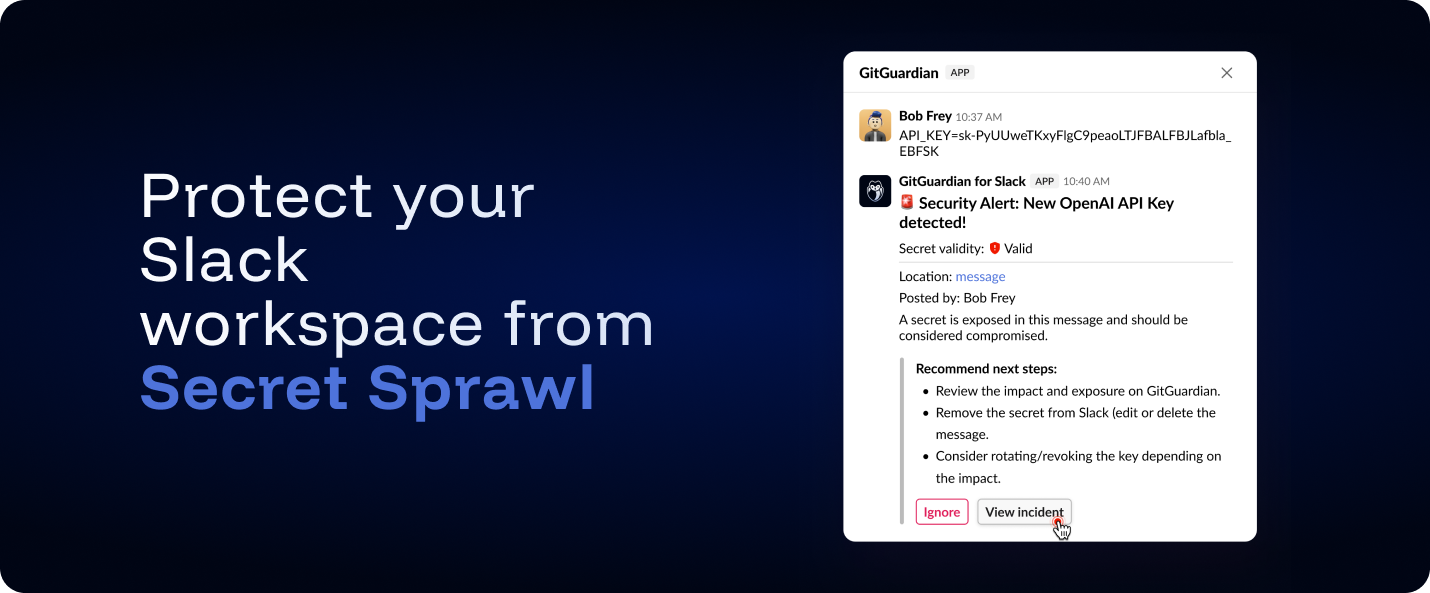
We're excited to announce that the GitGuardian Slack app is now officially listed and approved on the Slack Marketplace, available in both US and EU regions ! This means you can install GitGuardian directly from Slack's app directory, and the peace of mind that comes with Slack's marketplace review process. Beyond marketplace approval, this release bundles several improvements to the Slack integration that make it more powerful, more privacy-aware, and easier to operate at scale.
What's new?
- Channel selection at setup time: You now choose which public channels to monitor during installation, instead of the app automatically joining every public channel. This gives you full control over your scanning perimeter from day one.
- File attachment scanning: Secrets hiding in file attachments dropped in channels and messages are now detected alongside text-based messages.
- Interactive messages (Beta): When GitGuardian detects a secret, it posts a threaded response directly in the original conversation with details about the finding and quick actions — including the ability to ignore low-risk incidents without leaving Slack.
- Enhanced privacy controls: Private channel names are now redacted for users who don't have access to those channels in Slack, fully respecting Slack's privacy model. A privacy information banner is also displayed during setup to clarify what GitGuardian can and cannot access.
Why does this matter?
Slack is where developers share code snippets, debug outputs, and configuration examples in real-time. These casual exchanges frequently contain accidentally pasted API keys, database credentials, and tokens that persist in chat history. With the new GitGuardian Slack app, you extend your proactive defense and efficiently streamline the efforts with the responsibles of the leaks!
Get started
- Open the listing for your region: GitGuardian (US) or GitGuardian EU.
- In GitGuardian, go to Settings → Integrations → Sources and install Slack from the Messaging section, then complete the OAuth flow for your workspace.
If you previously covered your Slack Perimeter with GitGuardian, you will need to reinstall your Slack App using the same procedure.
Check out the full Slack integration guide for perimeters, private channels, and interactive messages configuration.
Enhancements
- Accessibility: Added support for Ctrl+Enter to submit forms, improving keyboard navigation efficiency.
- Jira Integration: Dynamic variables (e.g.,
{secretType},{sourceName},{sourceType}) can now be used across all Jira fields — including Labels, Summary, Priority, and custom fields — not just the description. Variables are interpolated at incident creation time, making it easier to build filtered Jira dashboards and reports. Learn more.
Fixes
- Dashboard: Fixed an issue where filtering Personal Access Tokens could cause the UI to become unresponsive.
- Bitbucket Cloud Integration: Updated API calls to use the new workspace-scoped endpoints, following Bitbucket Cloud's deprecation of cross-workspace APIs.

