A smarter search bar - find incidents by value, author, file path, or in plain English
 Release Date: May 20, 2026
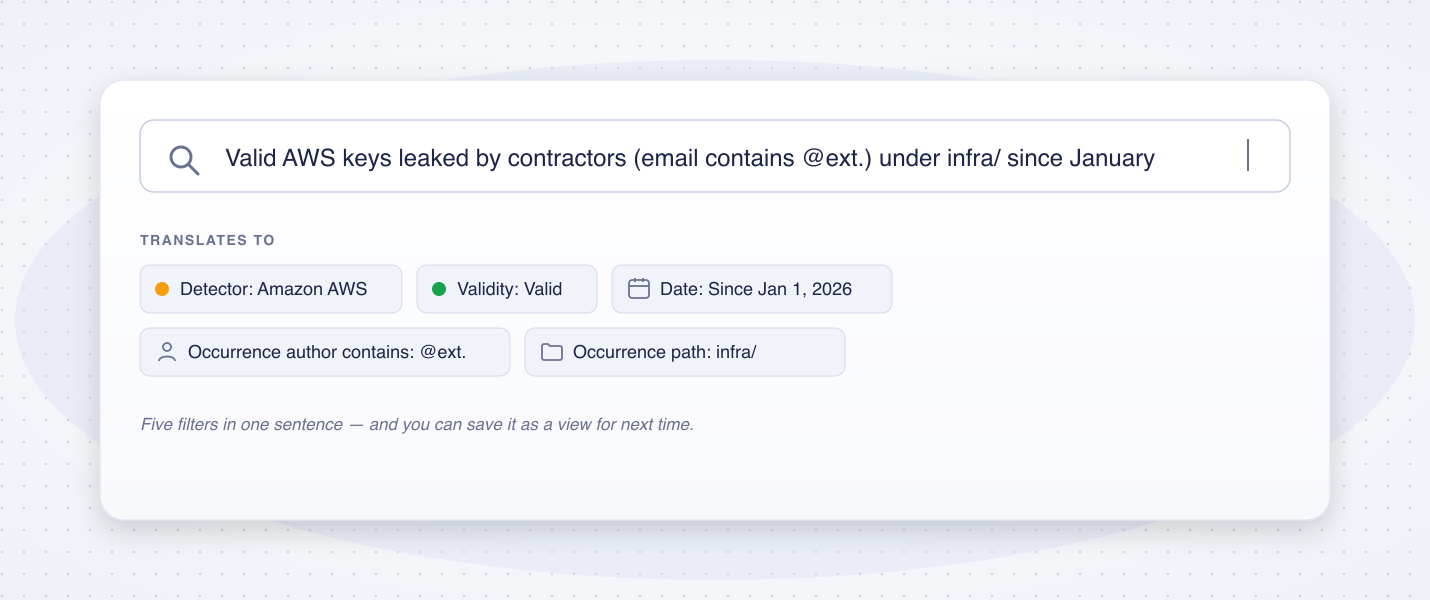
Cut incident triage time by getting straight to the right list. The search bar now answers the questions you actually ask during triage - "what did Alice leak in the last 3 months?", "which unassigned critical incidents need owners?" - without forcing you through a chain of filter menus.
What's new?
- Search by secret value: paste a secret directly into the bar to see if it's already raised an incident. The value is hashed in your browser before being sent, so the plaintext never leaves your device.
- Search by commit author: type a developer's name or email fragment (e.g.
@contractor.com) to surface every incident with at least one occurrence introduced by that person. - Search by file path: type any portion of a path (e.g.
.env,docker-compose.yml,config/secrets) to filter incidents whose occurrences match. - Search by source name: type any portion of a repository, channel, drive, or project name to scope the page to that source.
- Natural language search (AI Filters): when AI Filters are enabled on your workspace, type a full sentence and GitGuardian translates it into the right combination of filters - for example,
Open critical unassigned incidents related to cloud providers.
All search modes compose. You can mix structured filters, raw text, and a natural-language prompt in the same query, and save the result as a view to share with your team.
Why is this important?
Incident triage is fastest when you don't have to leave the page or know the exact filter name. By making the search bar the single entry point for every way you might describe what you're looking for, GitGuardian removes a layer of clicking from your day-to-day triage workflow - whether you're chasing a specific token, auditing a developer, or scoping leaks to a critical file.
Get Started Today!
The new search modes are available immediately on every workspace, on every plan. Natural language search requires AI Filters to be activated - see AI settings for the workspace settings and self-hosted prerequisites.
Learn more about the search bar
Enhancements
- Microsoft Teams notifications: Backfilled the Issue Regression event for existing Microsoft Teams notifier configurations - channels now alert when a previously resolved incident reopens, in addition to new incidents and new occurrences. Learn more
- JFrog Artifactory scanning: Incident details now capture additional metadata for secrets found in JFrog Artifactory, making it easier to identify the leak author and assign incidents to the right owner.
- Sources health management — Jira Cloud: GitGuardian now pauses real-time ingestion and historical scans on unreachable Jira Cloud sources, auto-resumes them once health is restored, and surfaces an actionable recovery step. Rolling out to more integrations in upcoming releases. See the Jira Cloud integration guide.
- Risk score in alerting and ticketing: Incident risk score update events are now available in Custom Webhook, Slack, Microsoft Teams, ServiceNow, Jira Cloud, and Jira Data Center.
Fixes
- Secret revocation: Fixed a case where revoking a Sendgrid API key from GitGuardian could surface a misleading error because the validity check was not re-run after the revocation request.
- Team perimeter: Restored the ability to bulk select all results when adding JFrog Artifactory sources to a team perimeter, previously broken on workspaces with large Artifactory repositories.
- GitHub health check: The GitHub and GitHub Enterprise health check now probes the documented
/metaendpoint instead of the API root. This fixes false Unhealthy statuses reported after upgrading to GitHub Enterprise Server 3.19.4. - Analytics: Fixed an issue where GitHub PR Check runs analytics dashboards were not displayed for GitHub Enterprise integrations.
- Perimeter performance: The source list now renders independently of the overview sidebar queries, fixing failed page renders on workspaces with very large source inventories (200k+ sources).

