Check validity and permissions of your vaulted secrets, from inside your network
 Release Date: October 15, 2026
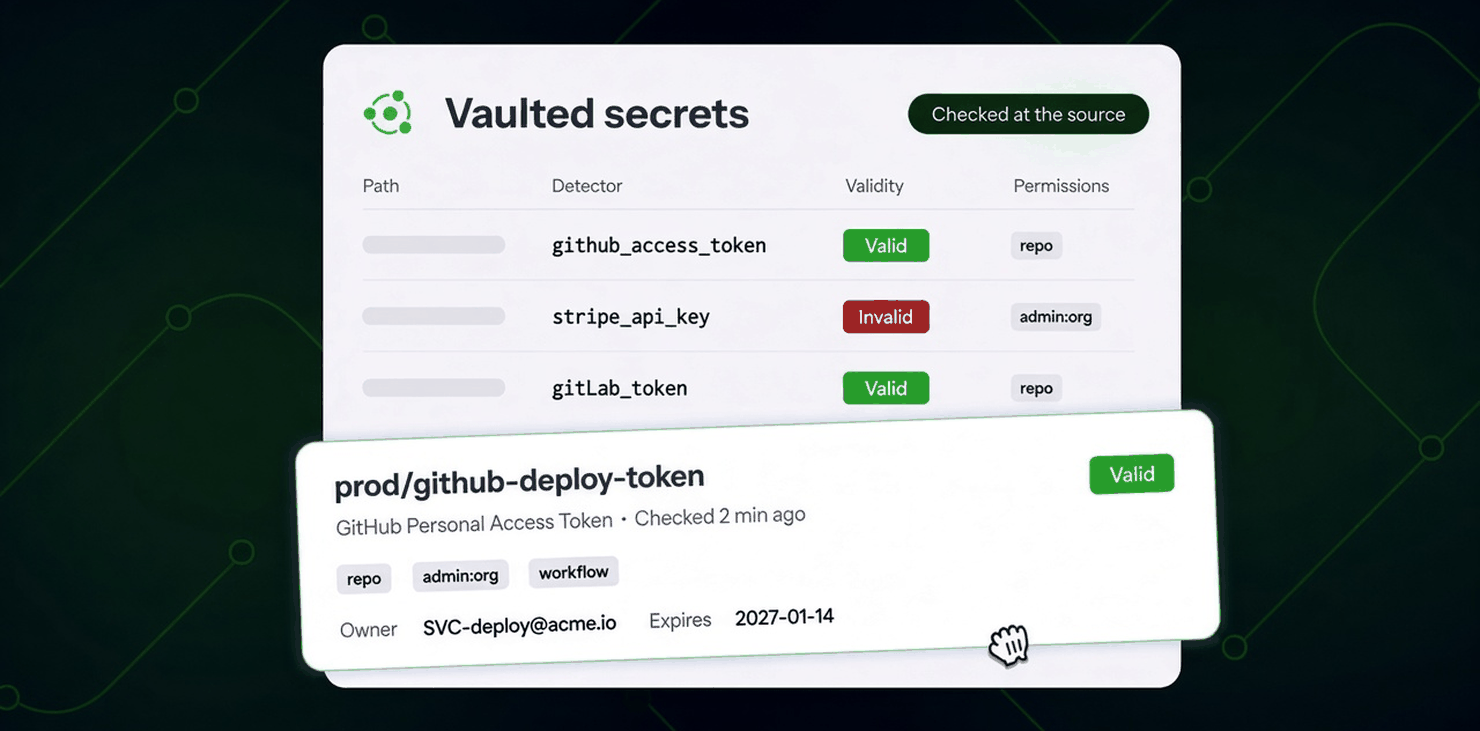
Every secret ggscout collects now comes with an answer to the questions that matter: does it still work, what can it do, who owns it, and when does it expire. Validity checks and permissions analysis run inside ggscout, right after classification and before hashing. The result lands in the NHI inventory as a Validity column and filter, with permissions, owner, and expiry in the identity detail.
What does this mean for you?
- Validity on all collected secrets: sort and filter the inventory by Valid, Invalid, or Unknown. Get the list of revoked credentials still sitting in your vaults, CI variables, and Kubernetes clusters, and clean them up without waiting for a leak.
- Permissions before you prioritize: see the scopes a token holds (
repoandadmin:orgon GitHub,apion GitLab, and so on). A valid token with admin scopes is a different emergency than a read-only one. - Owner and expiry from the provider: on top of the ownership and expiry your IdP and SaaS integrations already report, ggscout adds the account behind the credential, its expiry date, and the metadata the provider exposes, so you know who to call and how long the secret lives.
- One verdict across incidents and inventory: when a vaulted or Kubernetes secret also appears in a secret incident, GitGuardian merges both verdicts and keeps the most recent.
- On by default: upgrade, run a fetch, and the existing inventory is checked. Opt out per deployment with
[check] enabled = false.
Why run the checks in ggscout?
GitGuardian already checks leaked secrets from its servers. For vaulted secrets, and for secrets consumed in CI or Kubernetes clusters, the best place to run the check is next to the secret:
- Reach: an internal vault, a database behind a VPN, or any provider that only accepts traffic from your network answers ggscout. From GitGuardian's servers, those checks come back Failed to check.
- No allowlisting: you don't open your providers to GitGuardian's IP ranges. The check leaves your network only to reach the provider, and only the outcome reaches GitGuardian. Never the secret, never the provider's raw response.
- Freshness: verdicts refresh on every run, on the schedule you control, instead of a daily or weekly re-check.
Upgrade to ggscout 0.34.1 or later
Validity and permissions require ggscout 0.34.1 or later (Helm chart 0.5.23). On older versions, every collected secret stays Unknown. If you haven't upgraded since the spring, the move also brings:
- Classification by detector (ggscout 0.32): detector, secret family, category, and provider on every collected secret, with multi-field credentials kept together.
- Richer context (ggscout 0.33): environment metadata for Azure Key Vault, GitLab CI, and Akeyless, and a canonical secret hash that correlates reliably with your incidents.
- Pull the latest binary, Python package, Docker image, or Helm chart. Pin to
0.34.1orlatest. - Run
fetch-and-send. The log reportsN checked: X valid, Y invalid, Z failed to checkper source. - Open NHI Governance → Identities, add the Validity filter, and start with Invalid.
How checks work and how to opt out · Configure timeouts and concurrency · Validity and permissions in the NHI inventory
Enhancements
- Plans: GitGuardian plans are now Free (Starter), Growth, and Enterprise, replacing the former Free, Business, and Enterprise plans, and the Plan and usage page now compares the features and products each plan includes, grouped as on the pricing page.
- Historical scans: On Jira Cloud, scans you launch from the dashboard or the public API now start ahead of recurrent and system scans in the queue, so an on-demand scan no longer waits behind a scheduled backlog. On AWS S3 and version control sources, which already run on-demand scans in their own pool, public API launches made with a service account token now count as on-demand.
- Historical scans: The progress counters of running scans refresh more often, and a retried repository scan is now counted once in the bulk scan progress.
- Endpoint Protection: The discovered secrets page gains a built-in Valid saved view, available to everyone, listing the secrets checked as valid.
Fixes
- Incidents: Privacy mode now hides the full content of RSA private keys, not only their footer line.
- Perimeter: The team page and the perimeter filtered on that team now show the same sources. The team page counted sources hidden from the perimeter because their installation was flagged inactive.
- Endpoint Protection: Removed the First seen line of a secret location, which showed the latest scan time instead of the first detection. First detected in the secrets table is the reference.
- Slack notifier: Removing a Slack App notifier workspace now requires a workspace admin in sudo mode.

