Assess and improve your NHI security posture
Our security policies are informed by the OWASP Top 10 for NHIs, a comprehensive framework that highlights the most critical security risks they pose.
We support the following policies:
- Publicly Leaked Secrets: These are secrets that have been exposed publicly. GitGuardian identifies them through two signals: open incidents from our public monitoring services (with Public Monitoring), and matches with the public leaks known to HasMySecretLeaked (for all workspaces). HasMySecretLeaked matches found in more than 10 public locations are treated as common values and ignored. Such exposure can allow unauthorized parties to access sensitive systems, posing significant security threats.
- Internally Leaked Secrets: Secrets that have been inadvertently exposed within your internal perimeter can be detected through our private monitoring services. These internal leaks can be just as harmful as public ones, especially if internal defenses are breached.
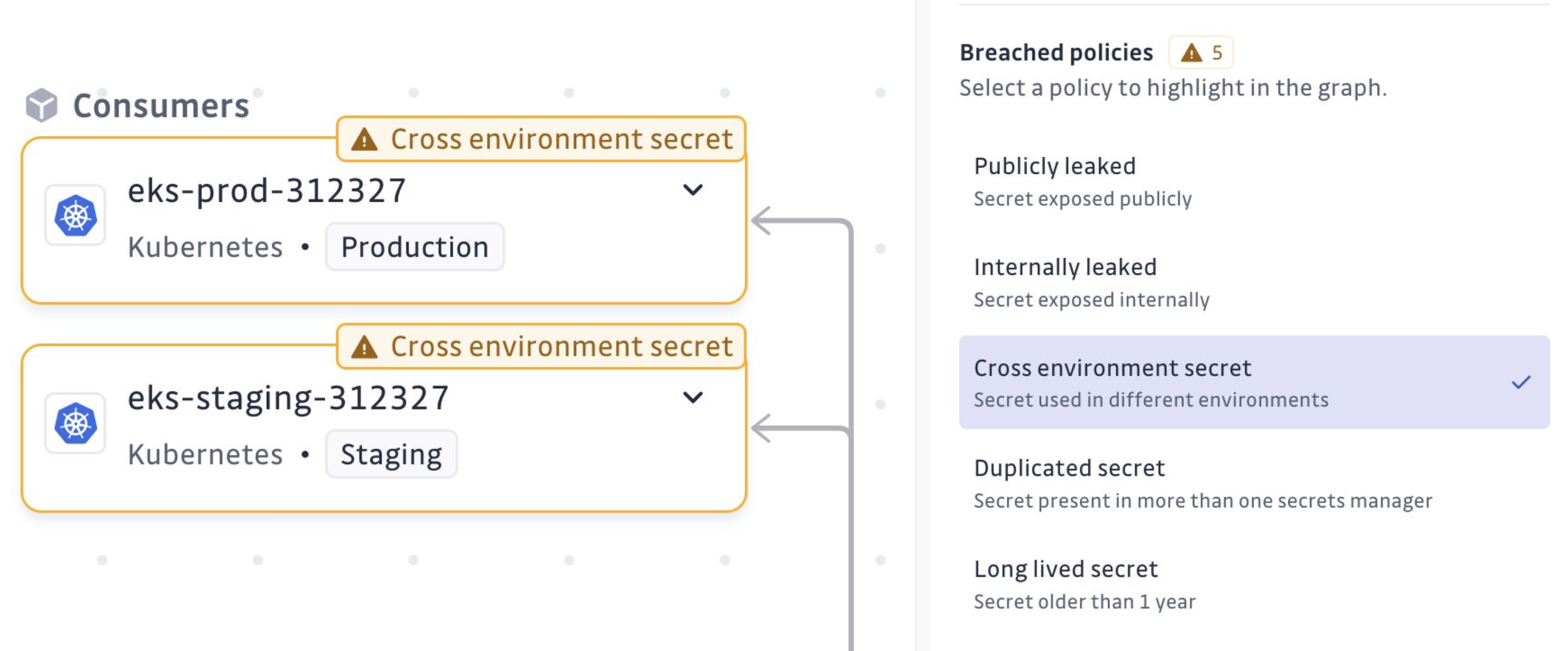
- Cross-Environment Secrets: A secret that is found in multiple environments, like both production and staging, can risk exposing sensitive production-level access to less secure environments. Ensuring each environment has distinct secrets helps maintain security boundaries. The environment of each copy is the one inferred per secret, not only the source-level
env. - Improper Offboarding: A previous version of a secret, no longer the current value at its path, that is still valid and linked to an open (triggered or assigned) secret incident. Replacing a leaked value in a vault does not revoke it: the old version stays usable until you revoke it and resolve the incident.
- Insecure Cloud Deployment Configuration: A GitHub Actions or GitLab CI secret whose name is a static cloud provider credential, such as
AWS_ACCESS_KEY_ID,AWS_SECRET_ACCESS_KEY,AZURE_CLIENT_SECRET,ARM_CLIENT_SECRET, orGOOGLE_APPLICATION_CREDENTIALS. Long-lived cloud keys stored in pipelines are a common target. Use OpenID Connect (workload identity federation) so that pipelines get short-lived cloud credentials instead. - Reused Secrets: When a secret is used by multiple entities, it increases the risk of compromise. If one entity is breached, others using the same secret can also be jeopardized. Ensuring unique secrets for each use case reduces this risk.
- Duplicated Secrets: Having the same secret stored in multiple vaults or paths can complicate management and increase the chance of using outdated or unrevoked credentials. It is crucial to maintain a single source of truth to manage secrets effectively.
- Long-Lived Secrets: Secrets that exist beyond a given lifespan (by default one year) without renewal are vulnerable to misuse. Regularly updating these secrets helps minimize the risk of prolonged exposure to potential threats.
- Overprivileged Identity: An identity that holds broad or wildcard permissions instead of permissions scoped to its task. Overprivileged NHIs widen the blast radius if their secret is compromised, so trimming entitlements back to least privilege is key to reducing risk. Evaluation is available for AWS IAM, Microsoft Entra, and Okta identities. See Detect overprivileged identities for the exact criteria.
In the inventory details, selecting a breach policy will visually highlight the locations of the issues on the exploration map.
Identify admin identities
In addition to policy breaches, GitGuardian flags identities that hold admin-level permissions on your infrastructure or identity provider. Admin NHIs are surfaced in the inventory with an Identity level: Admin badge and can be isolated with the dedicated Identity level filter (Admin / Non-admin).
Admin detection is available for:
- AWS IAM: principals attached to
AdministratorAccessorIAMFullAccess, or holding custom policies that allow*,iam:*, ororganizations:*on all resources. - Microsoft Entra: principals with high-impact directory roles (e.g. Global Administrator, Privileged Role Administrator, Application Administrator), admin-equivalent Azure RBAC roles (Owner, User Access Administrator, Role Based Access Control Administrator), or tier-1 Microsoft Graph permissions (e.g.
RoleManagement.ReadWrite.Directory). - Okta: principals with built-in admin roles (Super, Org, App, Group, User, API Access Management Admin) or custom roles granting admin-equivalent permissions.
Use this signal to focus remediation on the identities with the greatest blast radius, independently of whether they currently breach a policy.
Detect overprivileged identities
The Overprivileged Identity policy analyzes the permissions granted to each identity, as synced from your AWS IAM, Microsoft Entra, and Okta integrations. It does not compare these grants with the actions the identity performs: it flags permissions that are broad by nature, whatever the identity uses them for.
The analysis includes the permissions inherited from the groups the identity belongs to. A secret (access key, client secret, API token) takes the result of the identity that owns it.
An identity breaches the policy when it holds one of the following:
-
AWS IAM:
- An admin managed policy:
AdministratorAccessorIAMFullAccess. - An AWS managed
FullAccesspolicy, such asAmazonS3FullAccessorAWSLambda_FullAccess. - A custom or inline policy with an
Allowstatement on the full wildcard action (*) or a service wildcard action (such ass3:*orec2:*), on any resource. Statements with aConditionblock do not breach the policy, because it does not evaluate conditions.
- An admin managed policy:
-
Microsoft Entra:
- An admin directory role: Global Administrator, Privileged Role Administrator, Privileged Authentication Administrator, Application Administrator, Cloud Application Administrator, Hybrid Identity Administrator, Domain Name Administrator, or Partner Tier2 Support.
- An Azure RBAC role that is admin-equivalent (Owner, User Access Administrator, Role Based Access Control Administrator) or that allows all actions (
*), such as Contributor. - A high-privilege Microsoft Graph application permission. This includes the tier-1 permissions used for admin detection and write permissions with a large blast radius, such as
Directory.ReadWrite.All,User.ReadWrite.All,Group.ReadWrite.All,Mail.Send,Files.ReadWrite.All, orSites.ReadWrite.All. Delegated permissions do not breach the policy.
-
Okta, when the grant applies to the whole organization:
- A built-in admin role: Super, Org, App, Group, User, or API Access Management Admin.
- A custom role or OAuth scope that includes a composite permission:
okta.users.manage,okta.users.lifecycle.manage,okta.users.credentials.manage,okta.users.apitokens.manage,okta.groups.manage,okta.apps.manage,okta.devices.manage, orokta.devices.lifecycle.manage.
Roles scoped to specific groups, apps, or a resource set do not breach the policy. Granular permissions such as
okta.users.createdo not breach it either.
Most admin identities also breach this policy. The two signals answer different questions: the admin badge marks identities that can take control of the account, tenant, or organization, and the policy marks identities with grants wider than a scoped task requires.
Risk criticality
Each NHI in the inventory is assigned a Risk criticality level (low, medium, high, critical) derived from two layers:
- Base severity from the highest-risk active policy breach on the identity. For example, a publicly leaked secret rates critical, internally leaked rates high, overprivileged rates medium, long-lived rates low.
- Modifiers that bump the score by +1 level each, capped at critical:
- Admin identity: any breach on an admin NHI is one level more severe.
- Cross-environment with production: a cross-environment breach that touches a production environment, as inferred per secret, is one level more severe.
This means a leaked secret on an admin identity is surfaced as critical even if the leak itself is internal, letting you sort the inventory by risk and focus on the NHIs where an attacker would do the most damage first.
Note that new policies will be supported shortly.

