Export data
GitGuardian allows you to export data in the form of a CSV report.
CSV report
Export options
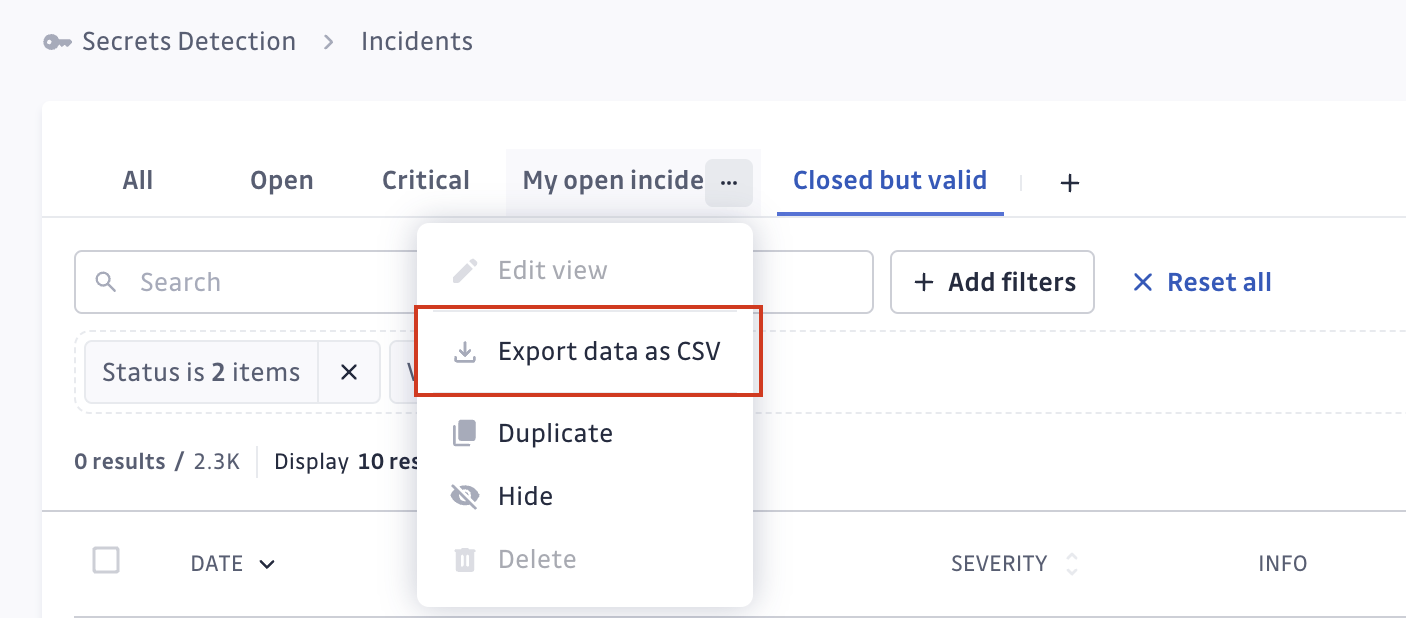
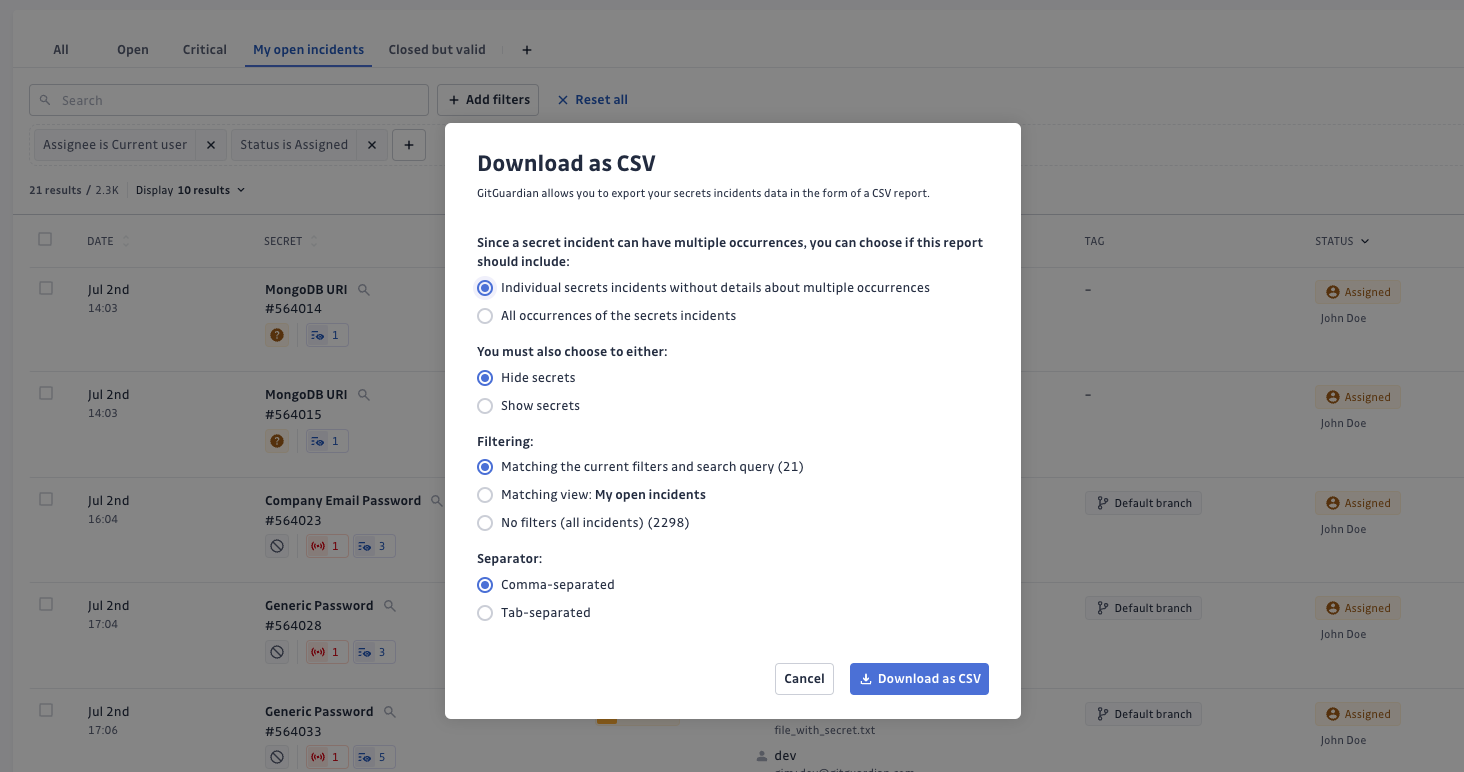
CSV reports are currently only available for secrets incidents. To export data, use the menu in the view, then select the options for the export:
- Individual secrets incidents vs All occurrences.
- Individual secrets incidents gives you the list of the secrets incidents present on your perimeter without details about multiple occurrences they may contain. It is useful for high level reporting.
- All occurrences gives you the detailed list of all the occurrences and their location. Such reports can be used for remediation or more granular analysis.
These two reports are consistent between one another and you can cross-reference their data using the common keyincident_id.
- Show secrets vs Hide secrets: fighting secrets sprawl, GitGuardian gives you the option to hide the secret itself in your CSV exports.
- Filtering: CSV reports can reflect your filtering and selection.
- Matching the current filters and search query: only incidents matching your current filtering criteria will be exported.
- Matching view: incidents matching the filters from the active view will be exported. If you have unsaved modifications in the view, they will not apply.
- No filters: all incidents will be exported, regardless of the view or filters applied.
- Separator: customize the separator of the report.
- comma-separated
- tab-separated
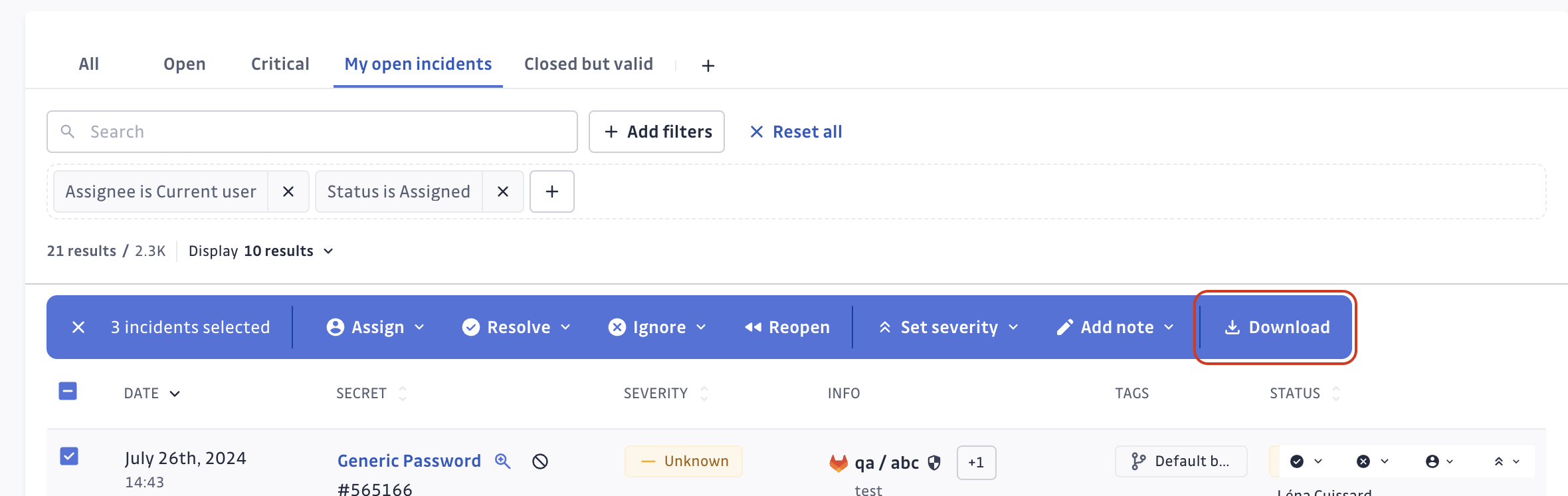
Note that it is also possible to export incidents that have been manually selected. Select your incidents and hit Download from the bulk actions bar:
Export format
The format of the CSV export will look like the below examples.
Individual secrets incidents
| incident_id | created_at | secret_hash | detector_name | matches | occurrences_count | assignees | resolved_at | ignored_at | gitguardian_url | severity | risk_score | validity | status | ignore_reason | custom_tags | secret_revoked | tags | incident_name |
|---|---|---|---|---|---|---|---|---|---|---|---|---|---|---|---|---|---|---|
| 186644 | 2020-11-17 08:19:48.374388+00:00 | CKRCZ36VU1JgnPTN2oWtW5Rn2fE7p/d9G+XQveEXlSg0d+Vjq3vgT7VWMTb6ax/h | Slack User Token | {"apikey": "xoxp-6378355290-4543728424-36021270421-7714dc2119e296b6e8be1cb6cde31ef5"} | 2 | https://dashboard.gitguardian.com/workspace/8/incidents/186644 | Critical | 55 | valid | TRIGGERED | Slack User Token in... | |||||||
| 49568 | 2020-03-25 13:26:11.134688+00:00 | kFXL5aDL5Pvf3odFhfS1Sfxxguqg7/tFOLgmM94+EPnMHwNGLCAWyy4SR5jhsuGk | AWS Keys | {"client_id": "AROAK1XZAJSZHCUDQSHT", "client_secret": "cH1SL1LFzSwWoJV5wDtn8rcTSNiieufBOe58b6Lu"} | 4 | john.doe@company.com | 2020-11-03 14:48:41.634750+00:00 | https://dashboard.gitguardian.com/workspace/8/incidents/49568 | Medium | 30 | invalid | RESOLVED | team:backend|env:production | TRUE | SENSITIVE_FILE | AWS Keys in config.yml | ||
| .... | .... | .... | .... | .... | .... | .... | .... | .... | .... | .... | .... | .... | .... | .... | .... | .... | .... | .... |
- incident_id: id of the GitGuardian incident
- created_at: date of the incident
- secret_hash: hash of the actual secret matches. It is unique per secret.
- detector_name: type of the secret detected by GitGuardian secrets detection engine
- matches: the actual secret. Sometimes it can be composed of several components that GitGuardian calls matches (eg:
client_id,client_secret). That's why it is under JSON format. Empty if you select Hide secrets option. - occurrences_count: count of occurrences of the secret incident
- assignees: email of the incident assignee who is member of the GitGuardian workspace
- resolved_at: timestamp of incident resolution date. If not empty, it means that the status of the incident is resolved
- ignored_at: timestamp of incident ignore date. If not empty, it means that the status of the incident is ignored
- gitguardian_url: link to the incident page on your GitGuardian workspace
- severity: severity level for the incident
- risk_score: risk score of the incident (integer, can be null)
- validity: validity of the secret (valid, invalid, no_checker, failed_to_check, unknown)
- status: status of the incident (TRIGGERED, ASSIGNED, RESOLVED, IGNORED)
- ignore_reason: declarative ignore reason by the person who ignored the incident (test_credential, false_positive, low_risk, invalid)
- custom_tags: custom tags assigned to the incident, pipe-separated key:value pairs (e.g.
team:backend|env:production) - secret_revoked: declarative information indicating whether or not the secret is revoked by the person who resolved the incident (True or False)
- tags: tags of the incident (CHECK_RUN_SKIP_FALSE_POSITIVE, CHECK_RUN_SKIP_LOW_RISK, CHECK_RUN_SKIP_TEST_CRED, DEFAULT_BRANCH, FALSE_POSITIVE, FROM_HISTORICAL_SCAN, IGNORED_IN_CHECK_RUN, PUBLIC, PUBLICLY_LEAKED, REGRESSION, REVOCABLE_BY_GG, SENSITIVE_FILE, TEST_FILE). Note: The
PUBLICLY_LEAKEDtag indicates any type of public exposure. See Public exposure information for details on exposure types. - incident_name: display name of the incident
All occurrences
| created_at | secret_hash | detector_name | matches | source_url | source_name | commit_url | commit_sha | commit_author | author_email | filepath | incident_id | gitguardian_url | validity | presence | occurrence_id | tags | element_url | author_name | incident_name |
|---|---|---|---|---|---|---|---|---|---|---|---|---|---|---|---|---|---|---|---|
| 2020-11-17 10:19:41.495062+00:00 | CKRCZ36VU1JgnPTN2oWtW5Rn2fE7p/d9G+XQveEXlSg0d+Vjq3vgT7VWMTb6ax/h | Slack User Token | {"apikey": "xoxp-6378355290-4543728424-36021270421-7714dc2119e296b6e8be1cb6cde31ef5"} | https://github.com/my-org/my-repos | my-org/my-repos | https://github.com/my-org/my-repos/commit/722682f316a934129996eccc4286d56a33812212#diff-568470d013cd12e4f388206520da39ab9a4e4c3c6b95846cbc281abc1ba3c959L3 | 722682f316a934129996eccc4286d56a33812212 | Lucius Fox | lucius-fox-gg@protonmail.com | app.py | 186644 | https://dashboard.gitguardian.com/workspace/8/incidents/186644 | valid | present | 4367688 | PUBLICLY_EXPOSED | https://github.com/my-org/my-repos/commits/commit-leaked | John Doe | Slack User Token in... |
| .... | .... | .... | .... | .... | .... | .... | .... | .... | .... | .... | .... | .... | .... | .... | .... | .... | .... | .... | .... |
- created_at: date of the occurrence
- secret_hash: hash of the actual secret matches. It is unique per secret.
- detector_name: type of the secret detected by GitGuardian secrets detection engine
- matches: the actual secret. Sometimes it can be composed of several components that GitGuardian calls matches (eg:
client_id,client_secret). That's why it is under JSON format. Empty if you select Hide secrets option. - source_url: VCS link of the source
- source_name: name of the source
- commit_url: VCS link of the commit (deprecated, please use element_url instead)
- commit_sha: sha of the commit
- commit_author: git name of the commit author (deprecated, please use author_name instead)
- author_email: email of the occurrence element author
- filepath: filepath containing the occurrence
- incident_id: id of the GitGuardian incident the occurrence belongs to
- gitguardian_url: link of the incident page on your GitGuardian workspace
- validity: validity of the secret (valid, invalid, no_checker, failed_to_check, unknown)
- presence: presence in git history of the occurrence (present, removed)
- occurrence_id: id of the occurrence
- tags: tags of the occurrence (CHECK_RUN_SKIP_FALSE_POSITIVE, CHECK_RUN_SKIP_LOW_RISK, CHECK_RUN_SKIP_TEST_CRED, DEFAULT_BRANCH, FALSE_POSITIVE, FROM_HISTORICAL_SCAN, IGNORED_IN_CHECK_RUN, PUBLIC, PUBLICLY_EXPOSED, PUBLICLY_LEAKED, REGRESSION, REVOCABLE_BY_GG, SENSITIVE_FILE, TEST_FILE)
- element_url: link to the occurrence element
- author_name: name of the occurrence element author
- incident_name: display name of the incident
Public monitoring CSV export
The following fields are specific to public monitoring exports. They differ from internal monitoring exports due to the nature of publicly exposed secrets.
Individual secrets incidents (public monitoring)
The public monitoring incidents export includes all the fields from the base incidents export (incident_id through custom_tags), plus the following fields instead of secret_revoked:
| incident_id | created_at | secret_hash | detector_name | matches | occurrences_count | assignees | resolved_at | ignored_at | gitguardian_url | severity | risk_score | validity | status | ignore_reason | custom_tags | ignore_reason | resolve_reason | tags | sources_count | attachment_reasons |
|---|---|---|---|---|---|---|---|---|---|---|---|---|---|---|---|---|---|---|---|---|
| .... | .... | .... | .... | .... | .... | .... | .... | .... | .... | .... | .... | .... | .... | .... | .... | .... | .... | .... | .... | .... |
Fields shared with internal monitoring are documented above. The following are specific to public monitoring:
- resolve_reason: reason provided when the incident was resolved
- sources_count: number of distinct sources where the secret was found
- attachment_reasons: space-separated list of reasons the incident is attached to the account's perimeter
- tags: tags of the incident, space-separated (COMPANY_NAME_IN_COMMIT, DECODED_BASE64, DECRYPTED, DOMAIN, FALSE_POSITIVE, FROM_EXPLORE, FROM_HISTORICAL_SCAN, FROM_SECRET_GRASPER, INTERNALLY_LEAKED, IS_COMPANY_CONTEXT, JWT_PROPERTIES, MINIFIED_FILE, PROD, SENSITIVE_FILE, TEST_FILE, WHITELISTED)
All occurrences (public monitoring)
The public monitoring occurrences export has a different structure from internal monitoring, with additional actor information from GitHub:
| created_at | secret_hash | detector_name | matches | source_url | source_name | filepath | commit_url | commit_sha | committer_name | committer_email | committer_github_id | committer_github_login | author_email | author_name | author_github_id | author_github_login | actor_github_id | actor_github_login | incident_id | incident_status | gitguardian_url | validity | presence | occurrence_id | tags | attachment_reasons |
|---|---|---|---|---|---|---|---|---|---|---|---|---|---|---|---|---|---|---|---|---|---|---|---|---|---|---|
| .... | .... | .... | .... | .... | .... | .... | .... | .... | .... | .... | .... | .... | .... | .... | .... | .... | .... | .... | .... | .... | .... | .... | .... | .... | .... | .... |
Fields shared with internal monitoring are documented above. The following are specific to public monitoring occurrences:
- committer_name: name of the commit committer
- committer_email: email of the commit committer
- committer_github_id: GitHub ID of the committer
- committer_github_login: GitHub login of the committer
- author_github_id: GitHub ID of the commit author
- author_github_login: GitHub login of the commit author
- actor_github_id: GitHub ID of the pusher
- actor_github_login: GitHub login of the pusher
- incident_status: status of the parent incident (TRIGGERED, ASSIGNED, RESOLVED, IGNORED)
- tags: tags of the occurrence, space-separated (COMPANY_NAME_IN_COMMIT, DECODED_BASE64, DECRYPTED, DOMAIN, FALSE_POSITIVE, FROM_EXPLORE, FROM_HISTORICAL_SCAN, FROM_SECRET_GRASPER, IS_COMPANY_CONTEXT, JWT_PROPERTIES, MINIFIED_FILE, PROD, SENSITIVE_FILE, TEST_FILE, WHITELISTED)
- attachment_reasons: space-separated list of reasons the occurrence is attached to the account's perimeter

