Machine learning
Detecting secrets with high quality results is a challenging and intricate task. To enhance our detection engine, we've implemented various machine learning models to analyze code like a professional developer, identify false positives, and enrich generic secrets with contextual information.
False Positive Remover
Only workspaces with a Growth or Enterprise plan can access this functionality.
When it comes to avoiding false positives, we've pushed imperative programming and regular expressions to their limits. It is simply not possible to write conditions or regular expression patterns for every potential scenario.
To overcome this technological constraint we implemented machine learning to train machines to quickly and efficiently navigate this complex domain and identify the elements we are looking for.
The False Positive Remover accurately identifies and tags incidents as 'false positives' through its thorough analysis.
The False Positive Remover runs on findings from all your sources, not just your code repositories. This includes non-code sources such as Confluence, Jira, Slack, and Microsoft Teams. Every new finding from these sources goes through the model automatically, so generic secrets can be detected on non-code sources without flooding your dashboard with false positives.
- For VCSs, the False Positive Remover is an internally developed and trained model, independent of third-party services, that accurately identifies and tags incidents as 'false positives' through its thorough analysis.
- For non-code sources, the False positive filtering relies on an LLM-based model and requires AI features to be enabled in your workspace. See AI settings.
How to use it?
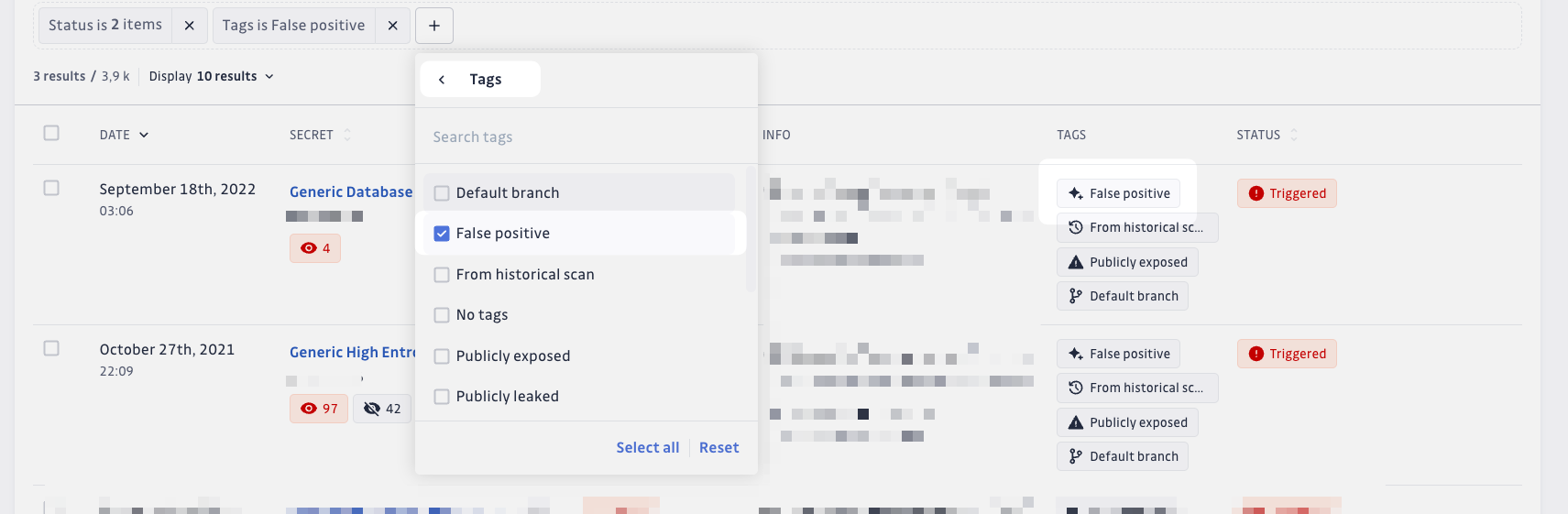
You can improve your workflow by using the Filters > GitGuardian tags > False positive filter located in the incidents list page.
This filter allows you to easily identify and manage false positive incidents, helping you streamline your incident resolution process.
FAQ
What does this model consider as "False positive"?
Something that cannot be a secret in any context.
In the example below ("signup_form_confirm_password": " Confirmar contrasinal") looks like a true positive for a regex but is not for our model which analyzes a context (lines before/after)
{
	"signup_form_username": "Identificador",
	"signup_form_password": "Contrasinal",
	"signup_form_confirm_password": " Confirmar contrasinal", <- a regex may consider this a true positive, not our model.
	"signup_form_button_submit": "Crear conta",
}
If these are false positives, why don't you just remove them?
We tag them as false positives rather than deleting them so you keep full visibility and stay in control. You can filter them out of your view, and you can always review what was tagged.
Are you catching all the false positives I have?
The model runs at high precision (around 95%) to avoid tagging real secrets as false positives. On generic secrets from non-code sources, it filters out 25 to 40% of findings on average. We keep improving recall over time while protecting precision.
Secret Enricher
Secret Enricher is a specialized machine learning model designed to analyze the context around generic secrets and automatically classify them into categories and providers. This enhanced classification helps you prioritize remediation efforts by understanding the potential impact and criticality of each incident.
This feature is specifically designed for generic incidents that couldn't be matched to a specific detector. The Secret Enricher analyzes the surrounding context to provide category and provider insights that help with prioritization and remediation.
Enrichment-Driven Incident Display
When Secret Enricher successfully enriches a generic incident, the enriched secret name automatically replaces the generic detector name. This means instead of seeing vague names like "Generic Database Assignment" or "Generic High Entropy Secret," you'll see precise, actionable names:
- Redis Identifiers instead of "Generic Database Assignment"
- Stripe API Key instead of "Generic High Entropy Secret"
- PostgreSQL Connection String instead of "Generic Database Assignment"
- AWS Access Key instead of "Generic High Entropy Secret"
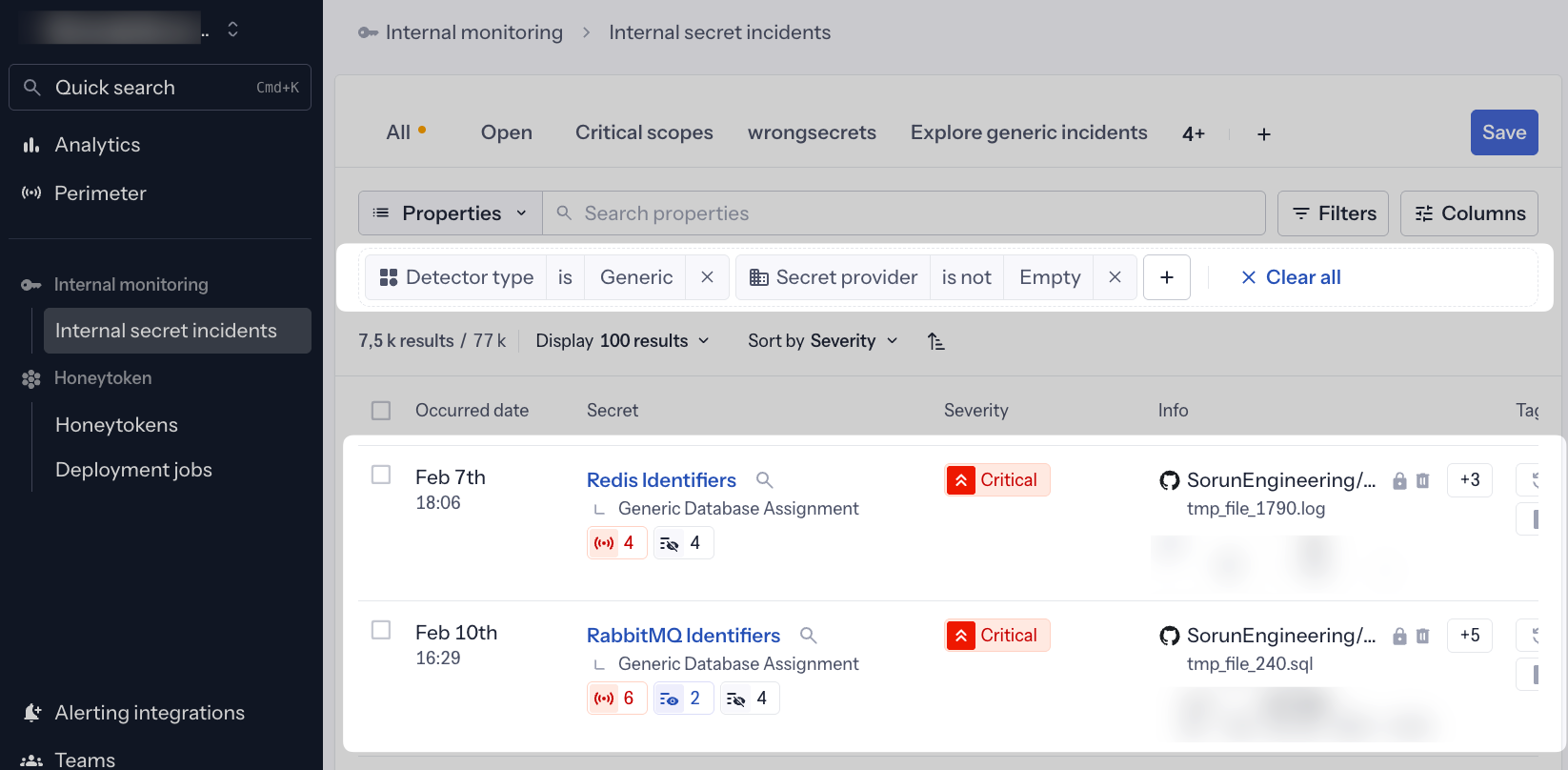
This enrichment-driven UX provides immediate context at a glance, eliminating the need to open each incident to understand what type of secret was exposed. The enriched names appear in:
- Incident lists
- Search results
- API responses
- CSV and JSON exports
In some instances, the detector name (e.g., "Generic High Entropy Secret") may be visible instead of the enriched name. We are working on this harmonization throughout the first months of 2026.
How Secret Enricher categories help with remediation
Understanding Secret Enricher categories helps you:
- Prioritize critical infrastructure secrets (Cloud providers, Databases, etc.)
- Focus on high-impact services (Payment systems, Identity providers, etc.)
- Identify secrets that could affect business operations (Messaging systems, E-commerce platforms, etc.)
- Streamline remediation workflows by grouping similar types of secrets
- Apply appropriate security policies based on the service type
How to use it?
Enriched names in incident lists
Enriched secret names are automatically displayed as the primary incident name in your incident lists. No configuration needed—when our ML model successfully identifies a secret type, you'll see it immediately.
This enrichment-driven approach makes incident triage faster and more intuitive. You can instantly identify:
- Database credentials (Redis, PostgreSQL, MongoDB)
- Cloud provider secrets (AWS, Azure, GCP)
- Payment system tokens (Stripe, PayPal, Square)
- API keys for specific services (Twilio, SendGrid, Slack)
Customize your views
From the incidents list, you can customize how your incidents are displayed by clicking on the "Columns" button in the top-right corner of the table.
This allows you to add the "Secret category" and "Secret provider" columns, which display additional enrichment properties inferred by the model alongside the enriched secret name.
With this customization, you can quickly spot important categories (such as "Data Storage") or specific providers that might require immediate attention among your incidents.
Filter your data
Three filters (Provider, Category, Family) help you identify the most significant or critical generic incidents, such as those classified under "Data Storage" or linked to the provider "Postgresql."
You can apply these filters in several ways:
Example 1 > Filter enriched incidents directly: Use "Detector Type is Generic" + "Secret Provider is not Empty" to find enriched generic secrets with at least a provider inferred
Example 2 > Group Generic Incidents by Secret Category: Use "Detector Type is Generic" + "Secret Category is Data Storage" to find enriched generic secrets related to Data management/storage
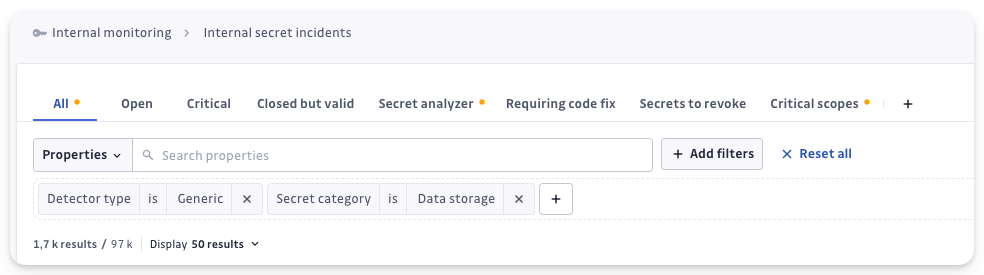
With these filters you can explore your enriched incidents and quickly identify the ones that matter most for your operations.
Categories and providers reference
For detailed definitions of all GSE categories and providers, including what they mean and how to prioritize them, see our comprehensive GSE Categories and Providers Reference.
FAQ
What happens if a secret can't be enriched?
If the ML model cannot identify a provider or category with confidence, the incident will retain its original generic detector name (like "Generic Database Assignment"). You can still use our filtering capabilities to find and investigate these unenriched incidents.
Why aren't these transformed into specific incidents?
Enriched incidents remain classified as "generic" from a detection perspective because the enrichment is based on contextual analysis, not pattern-based detection rules. However, the enriched name provides the actionable specificity you need for prioritization and remediation. As we continue to refine this feature, our definitions will become more precise, and we may convert highly confident enrichments into specific detectors.
What is the model trained to discover?
The model can identify a comprehensive set of categories and providers:
The model can identify the following categories:
- AI
- CDN
- CI/CD
- Cloud provider
- Code analysis
- Collaboration tool
- CRM
- Cryptos
- Data storage
- E-commerce
- Identity provider
- Internal
- Messaging system
- Monitoring
- Other
- Package registry
- Payment system
- Private key
- Remote access
- Secret management
- Social network
- Version control platform
The model can identify hundreds of providers including:
- Amazon AWS and related services
- Microsoft Azure and related services
- Google Cloud Platform
- Popular databases (PostgreSQL, MySQL, MongoDB, Redis)
- CI/CD platforms (GitHub, GitLab, Jenkins, CircleCI)
- Payment systems (Stripe, PayPal, Square)
- AI services (OpenAI, Anthropic, Hugging Face)
- Messaging platforms (Slack, Discord, Twilio)
- And many more...
For the complete list of supported categories and providers, see the GSE Categories and Providers Reference.
Risk score (ML-powered incident prioritization)
The risk score is a machine learning-powered feature that automatically assesses the risk level of each incident on a scale of 0-100, where 100 indicates the highest risk and 0 the lowest. It analyzes multiple risk signals including secret type, validity, exposure context, and behavioral patterns to help you focus on the incidents that pose the greatest threat.
The risk score uses machine learning models that are continuously improved based on user feedback. If you notice incidents with unexpected scores or explanations, we encourage you to share feedback directly through the dashboard — your input helps us refine the scoring model.
Key capabilities
- Automatic risk assessment for all secret incidents (both Internal and Public Monitoring)
- Dynamic scoring that updates as incident context evolves
- Natural language explanations generated for each incident
- Granular prioritization with a 0-100 scale for fine-tuned remediation workflows
- Feedback loop for future model improvement
Where to use it
The risk score is available as part of the incident prioritization and investigation features:
- Risk score for Internal Monitoring
- Risk score for Public Monitoring - superseded by the agents analysis on workspaces that have been switched
This feature is part of GitGuardian's broader ML initiative to enhance both detection precision and remediation efficiency.
Similar incident grouping (ML-powered)
Similar incident grouping is a machine learning-powered feature that automatically identifies and groups related incidents based on contextual similarities. Instead of reviewing incidents one by one, you can process entire groups of similar incidents together, dramatically accelerating your remediation workflow.
Key capabilities
- Automatic grouping of incidents sharing similar characteristics (similar code context in the patch)
- Bulk remediation actions to resolve multiple related incidents at once
- Dynamic group updates as new incidents are detected or existing ones are resolved
How it helps
Similar incident grouping helps you:
- Reduce remediation time by handling groups of related incidents together instead of individually
- Identify systemic issues when the same type of secret appears across multiple locations
- Apply consistent remediation across similar incidents to maintain security policy coherence
- Focus on unique incidents by quickly processing groups of similar ones first
Where to use it
Similar incident grouping is available in the incident remediation workflows:
This feature is part of GitGuardian's broader ML initiative to enhance both detection precision and remediation efficiency.

