Integrate JFrog Package Registries
Secure your software supply chain by monitoring JFrog Package Registries for exposed secrets in package artifacts across multiple ecosystems.
Why Monitor JFrog Package Registries?
JFrog Artifactory serves as the universal package management solution for your organization, hosting packages across multiple ecosystems such as Maven, npm, PyPI, NuGet, Go, Gradle, and more. These packages often contain production database credentials, enterprise API keys, internal service tokens, and other sensitive configuration that, when exposed, can compromise critical business applications and provide unauthorized access to proprietary systems and sensitive customer data.
Capabilities
| Feature | Support | Details |
|---|---|---|
| Historical Scanning | ✅ (Supported) | Analyze existing packages and their contents |
| Incremental Scanning | ✅ (Supported) | Regular scheduled scanning for new content |
| Monitored Perimeter | ✅ (Supported) | Granular monitoring of your repos |
| Team Perimeter | ✅ (Supported) | Team-based access control |
| Presence Check | ❌ (Not Supported) | All occurrences considered present |
| Source Visibility | ❌ (Not Supported) | All sources are considered as private |
| File Attachments | N/A | Not applicable for package registries |
What we scan:
- Maven artifacts
- npm packages
- PyPI packages
- Gradle artifacts
- Go modules
- Swift packages
- Cargo crates
- RubyGems
- NuGet packages
- Composer packages
- Pub packages
- Generic repositories
This integration automatically scans your monitored repositories, downloading package artifacts which may incur bandwidth costs. To optimize costs and reduce false positives, carefully select the sources to monitor and use our filepath exclusion feature.
Plan requirements: Available for GitGuardian Enterprise plan. Try it for free with a 30-day trial - any detected incidents remain accessible after the trial ends.
Detector coverage: To minimize false positives, Generic High Entropy Secret and Generic Password are disabled. All other detectors are enabled.
Understanding scanning capabilities
Historical scanning
Uncover your secret debt: When you first integrate this source, GitGuardian performs a comprehensive scan of your entire content history, based on your customized perimeter. This reveals secrets that may have been exposed weeks, months, or even years ago - helping you address your existing security debt.
How to trigger a historical scan: Go to your perimeter page, select the sources you want to scan, and click Scan in the bulk actions bar. See Manage your monitored perimeter for plan-based size limits, error handling, and full details.
Incremental scanning
Stay protected with regular monitoring: Once integrated, GitGuardian provides ongoing protection through scheduled automated scans of your content. New and modified content is systematically monitored at regular intervals, ensuring comprehensive coverage and timely detection of any secret exposures. Your source remains under GitGuardian's protection, giving you confidence that secrets won't go unnoticed.
Setup your JFrog Package Registries integration
Prerequisites:
- Owner or Manager account on your GitGuardian Dashboard
- JFrog admin permissions to create Access Tokens in your JFrog instance
- Network connectivity between GitGuardian and your self-hosted services. Check out GitGuardian Bridge to enable secure connections between GitGuardian SaaS and your self-hosted services in private networks.
GitGuardian integrates with JFrog Package Registries via an Access Token with admin scope on your JFrog instance. Admin scope is required to enumerate repositories and download package artifacts across all package types.
You can install GitGuardian on multiple JFrog instances to monitor your package repositories.
-
Make sure you're logged as an administrator in your JFrog Platform
-
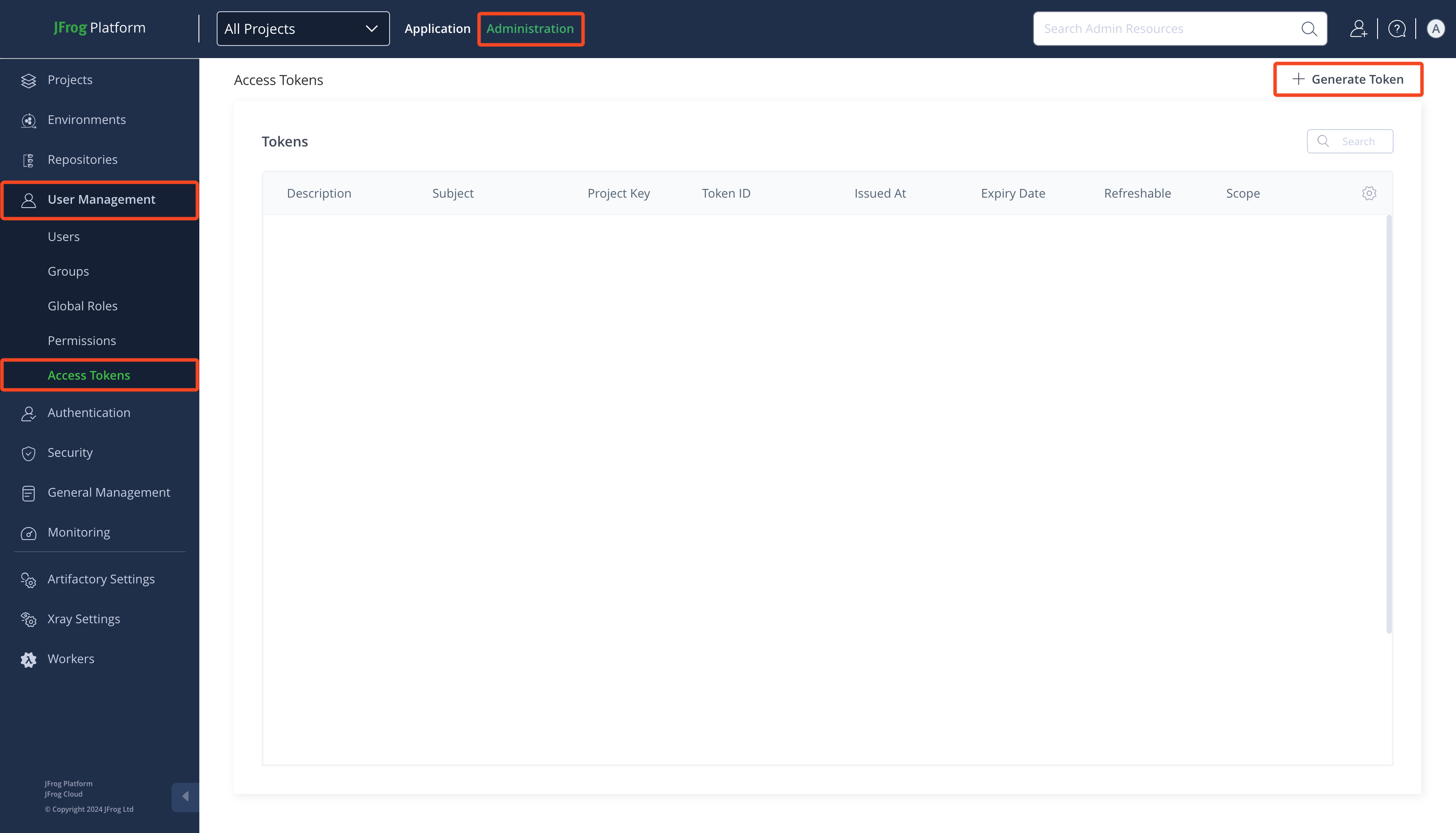
Go to Administration > User Management > Access Tokens
-
Click Generate Token
-
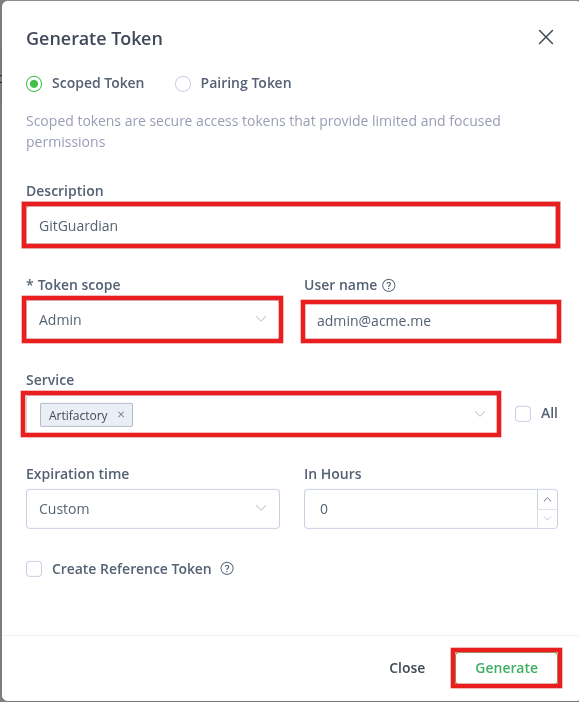
Type a Description (e.g.:
GitGuardian) -
Select
Adminas Token scope -
Uncheck All and select
Artifactoryas Service -
Click Generate
-
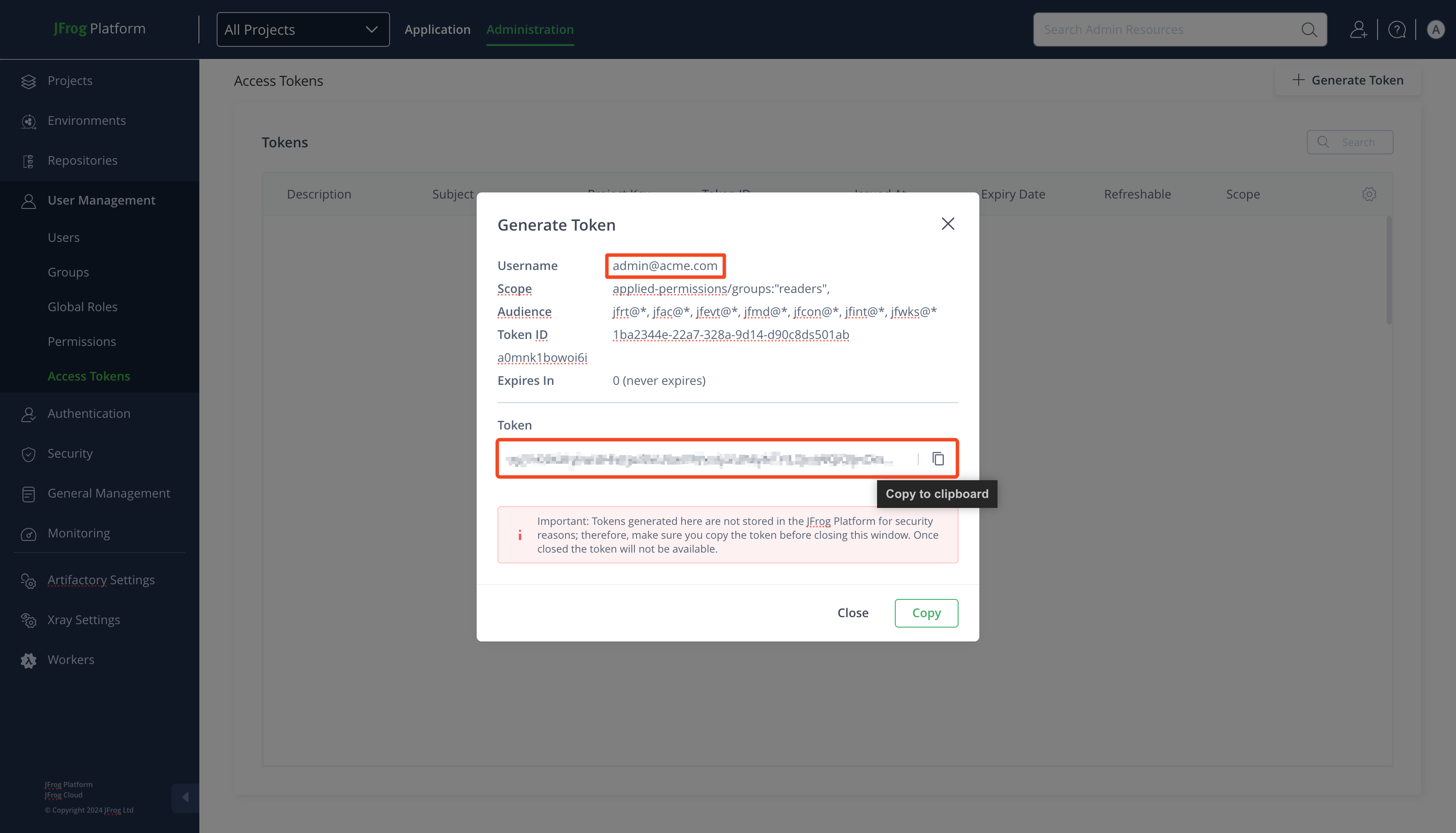
Get the Username and copy the Token
-
In the GitGuardian platform, navigate to the Sources integration page
-
Click Install next to JFrog Package Registries in the Package registries section

-
Click Install on the JFrog Package Registries integration page
-
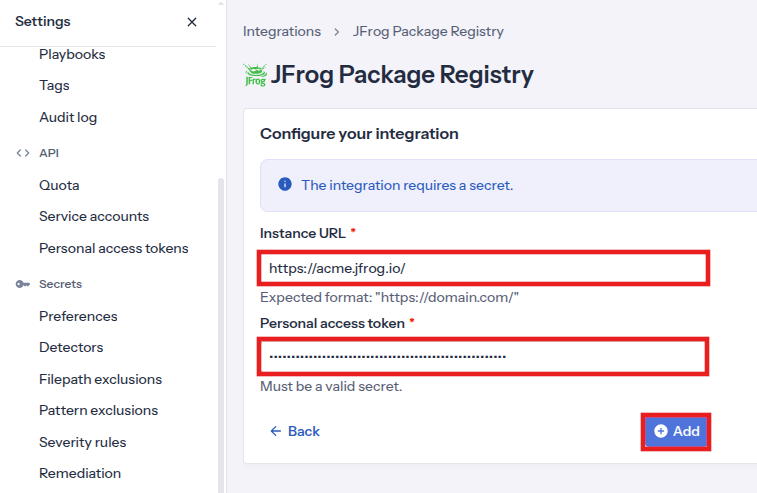
Type your JFrog instance URL (e.g.:
https://acme.jfrog.io/) -
Paste your Personal access token
-
Click Add
-
Customize your monitored perimeter:
- Monitor specific JFrog repositories (Recommended)
- No repositories are monitored by default, you will have to select them manually.
- Newly created repositories will not be monitored by default. You can adjust this setting at any time.
- Recommended to optimize your bandwidth costs.
- Monitor the entire JFrog instance
- All repositories are monitored by default with a full historical scan automatically triggered.
- Newly created repositories will be monitored by default. You can adjust this setting at any time.
- Monitor specific JFrog repositories (Recommended)
That's it! Your JFrog instance is now installed, and GitGuardian is monitoring all packages of your selected repositories for secrets.
Customize your monitored perimeter
To customize the monitored repositories, navigate to your JFrog Package Registries settings from the Sources integration page.
- Select/Unselect repositories to include or exclude them from monitoring
- Confirm by clicking Update monitored perimeter
Automatic repository monitoring
You can enable or disable the automatic addition of newly created repositories to your monitored perimeter by switching the option in your JFrog Package Registries settings.
Managing your integration
Monitoring health and Maintenance
If you need to modify your integration settings or troubleshoot connectivity issues, access the management interface through Sources integration.
Uninstalling the integration
While our goal is to help you maintain comprehensive security coverage, you may uninstall the integration whenever necessary:
- Navigate to Sources integration
- Click Edit next to the integration name
- Click Configure
- Click the delete icon next to your resource
- Confirm the removal
Note: Removing the integration preserves your incident history, but stops future scanning and presence checks for the integrations that support it.
Uninstall your JFrog Package Registries instance
To uninstall a JFrog Package Registries instance:
- In the GitGuardian platform, navigate to the Sources integration page
- Click Edit next to JFrog Package Registries in the Package registries section
- Click the bin icon next to the JFrog Package Registries instance to uninstall
- Confirm by clicking Yes, uninstall in the confirmation modal
That's it! Your JFrog Package Registries instance is now uninstalled.
Excluded paths
GitGuardian automatically excludes files from scanning if their paths contain any of these regular expressions:
/__pypackages__/
/\.venv/
/\.tox/
/site-packages/
/venv/
distutils/command/register\.py
python.*/awscli/examples/
python.*/dulwich/(tests|contrib/test_)
python.*/hgext/bugzilla\.py
python.*/mercurial/util\.py
python.*/test/certdata/
python.*/urllib/request\.py
python.*/pygments/lexers/
/cryptography.+/tests/.+(fixtures|test)_.+\.py
/python.+pygpgme.+/tests/
botocore/data/.+/(examples|service)-.+\.json
usr(/local)?/lib/python.+/dist-packages
/libevent.+/info/test/test/
/conda-.+-py.+/info/test/tests.+/test_.+\.py
/python[^/]+/test/
/man/man5/kdc\.conf\.5
erlang.*(inets|ssl).*/examples/
/gems/.*httpclient.*/(test|sample)/
/gems/.*faraday.*/
/vendor/bundle/
/\.gem/
ruby-[^/]+/test/openssl/
/(g|G)o/src/cmd/go/internal/.*_test\.go
/(g|G)o/src/cmd/go/internal/.*/testdata/
/(g|G)o/src/cmd/go/testdata/
/(g|G)o/src/crypto/x509/platform_root_key\.pem
/(G|g)o/src/crypto/(tls|x509)/.*_test\.go
/(g|G)o/src/net/(url|http)/.*_test\.go
src/github.com/DataDog/datadog-agent/.*test.*\.go
google/internal/.*_test\.go
golang.org.*oauth2@.*/.*\.go
/flutter/.*/packages/flutter_tools/test/data/
/flutter/.*/examples/image_list/lib
/\.pub-cache
etc/ssl/private/ssl-cert-snakeoil\.key
perl.*Cwd\.pm
ansible/.*/tests/(integration|unit)/
ansible/.*/test/awx
ansible/collections/ansible_collections/.*/plugins/
/curl/.*/(tests|docs|lib/url\.c)
/doc/wget.+/NEWS
dist/awscli/examples/
usr(/local)?/lib/aws-cli/examples/
/google-cloud-sdk/(lib|platform)/
\.git/modules/third[-_]?party/
\.git/modules/external/
/\.npm/_cacache
/node_modules/
/\.parcel-cache/
/\.yarn/cache/
/\.m2/
/\.ivy2/cache/
/\.mix/
/\.hex/
/composer/cache/
/\.nuget/packages/
/libgpg-error/errorref\.txt
/Homebrew/Library/Taps/
/tcl[^/]+/http-.+\.tm
/tcl[^/]+/[^/]+/http-.+\.tm
usr/share/lua/[^/]+/posix/init\.lua
openssl/openssl-[^/]+/test/recipes/
usr/share/doc/libssl-doc/demos/
boringssl/src/third_party/[^/]+test[^/]+/[^/]+_test\.json
Additional Self-Hosted considerations
For GitGuardian Self-Hosted instances:
- Worker requirement: JFrog Package Registries scanning requires dedicated
scanners-db-lessworkers. Ensurescanners-db-less.replicasis set to a value greater than 0 in your Helm configuration. - Cache: The
commit-cacheRedis instance is used for JFrog Package Registries scanning. If thecommit-cacheRedis instance is not configured, the main Redis instance will be used instead. - Scan frequency can be configured in the Admin Area:
- Time interval unit: seconds
- Default value: 86400 (1 day)
- Minimum value: 1800 (30 minutes)
Example Helm configuration:
celeryWorkers:
  scanners-db-less:
    replicas: 2
Privacy
Data handling
GitGuardian processes your data solely to detect exposed secrets:
- Read-only access: We never require write access unless scoped to creating webhooks to receive and process real-time events
- Minimal data retention: We store only data and metadata necessary for incident management
- Encryption: All data in transit and at rest is encrypted
- Compliance: We follow the same data protection standards as our other integrations
Regional considerations
GitGuardian hosts its services in two AWS regions: eu-central-1 (Frankfurt) and us-west-2 (Oregon). Ensure your GitGuardian deployment region aligns with your data residency requirements. Contact support if you need guidance on compliance with local regulations.
Country-specific laws and regulations may require you to inform your users that your repositories are being scanned for secrets. Here is a suggestion for a message you may want to use:
As part of our internal information security process, the company scans its repositories for potential secrets leaks using GitGuardian. All data collected will be processed for the purpose of detecting potential leaks. To find out more about how we manage your personal data and to exercise your rights, please refer to our employee/partner privacy notice. Please note that only repositories relating to the company's activity and business may be monitored and that users shall refrain from sharing personal or sensitive data not relevant to the repository's purpose.

